AISTIM / MT4 / 2026-11-07
Apex Scanner Elite · Successful cracking case studies
Compare the original and cracked versions: the chart dashboard, signals and price levels, plus 75 input settings and every dropdown option.
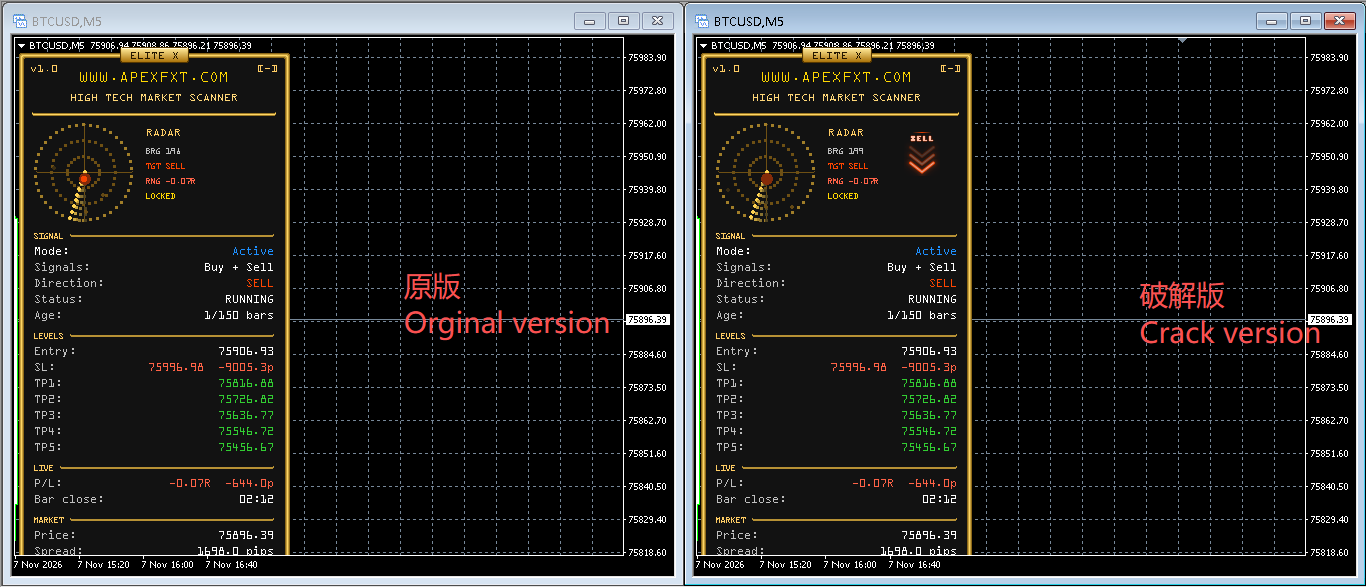
Chart comparison
User-supplied BTCUSD / M5 comparison: original on the left, cracked version on the right. The original image is displayed unchanged.
Input comparison
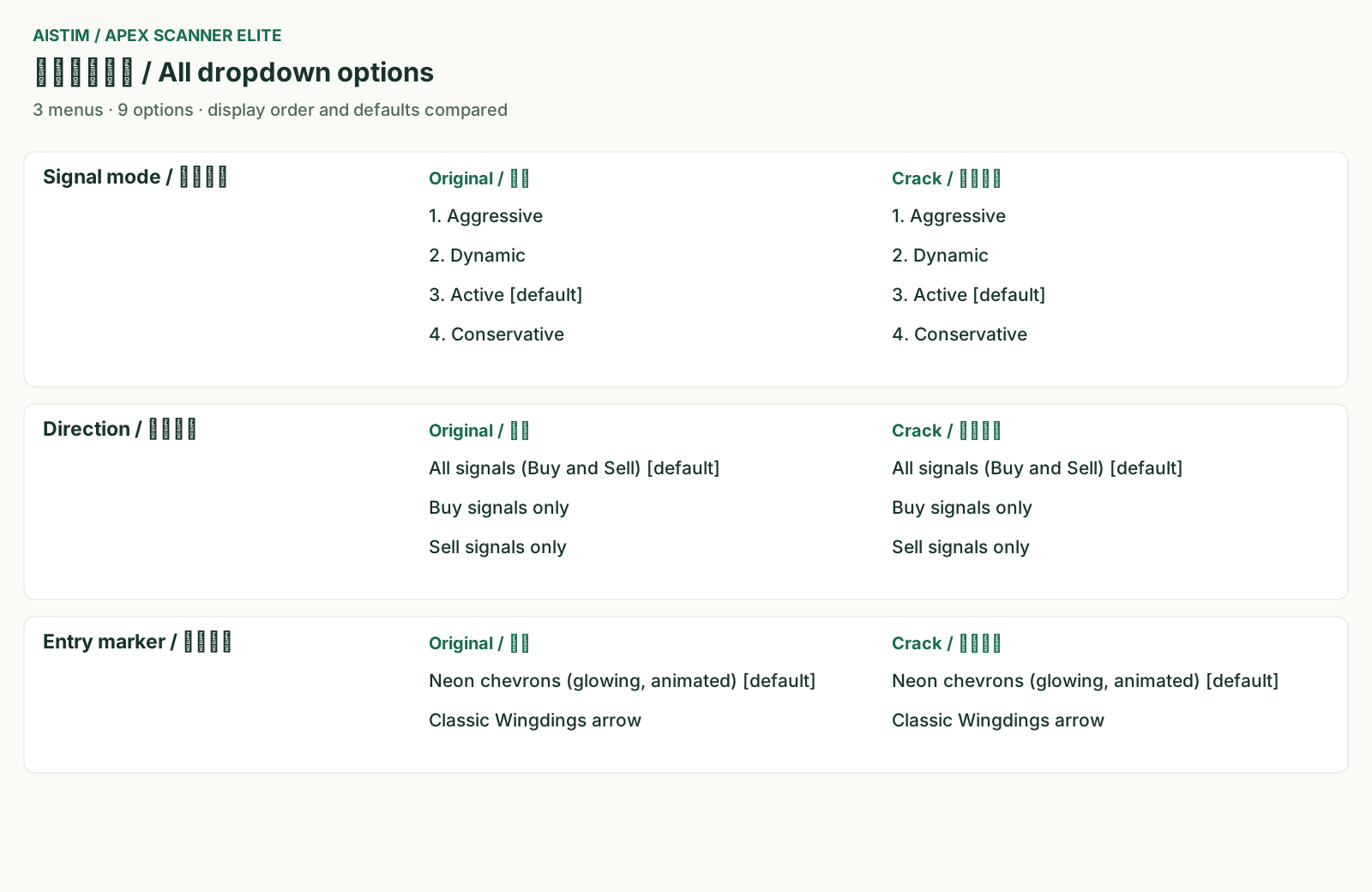
Comparison graphics compiled from the original input references and the supplied source input declarations. All 75 defaults and nine dropdown options are shown; these are not native parameter-dialog screenshots.
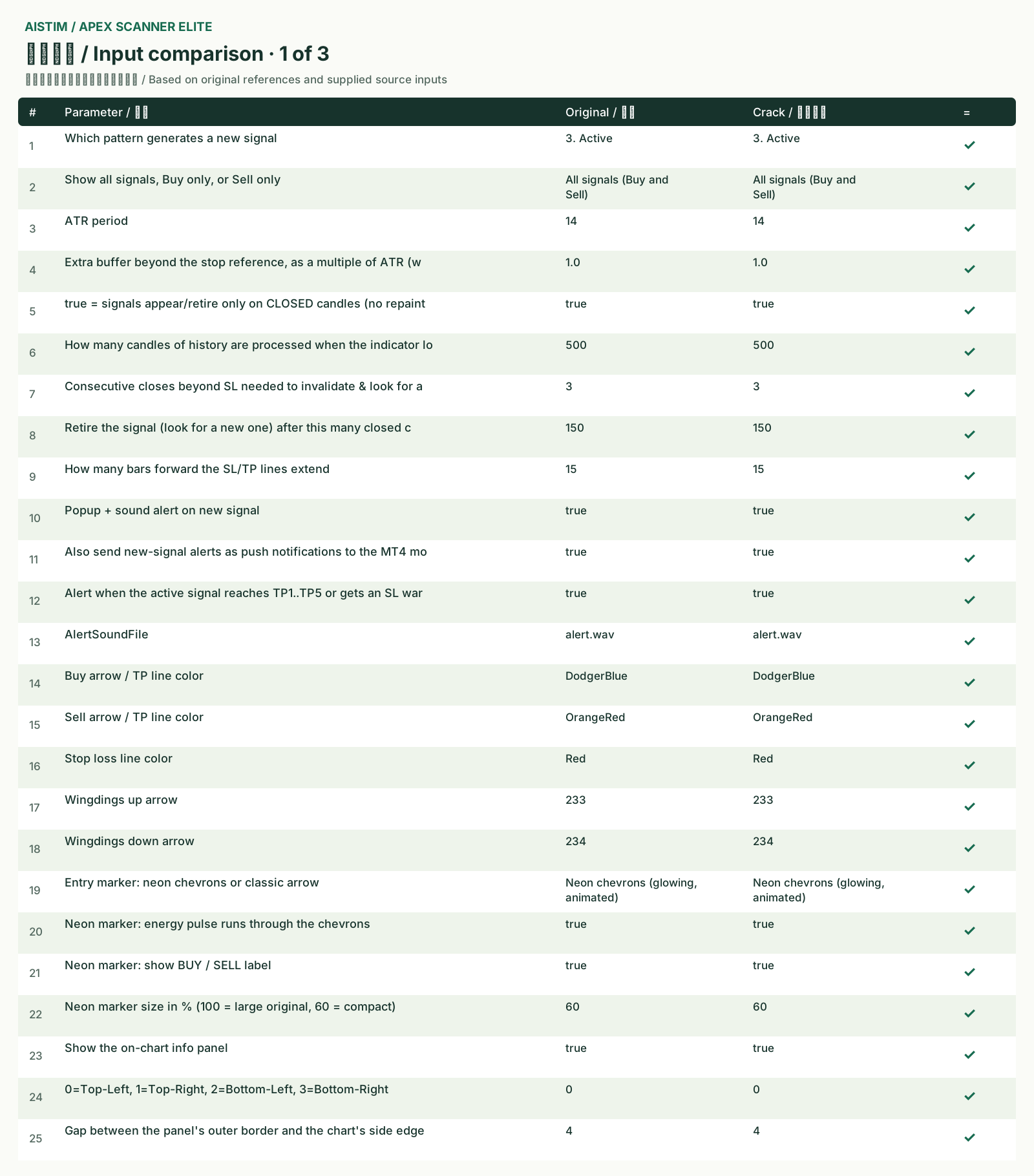
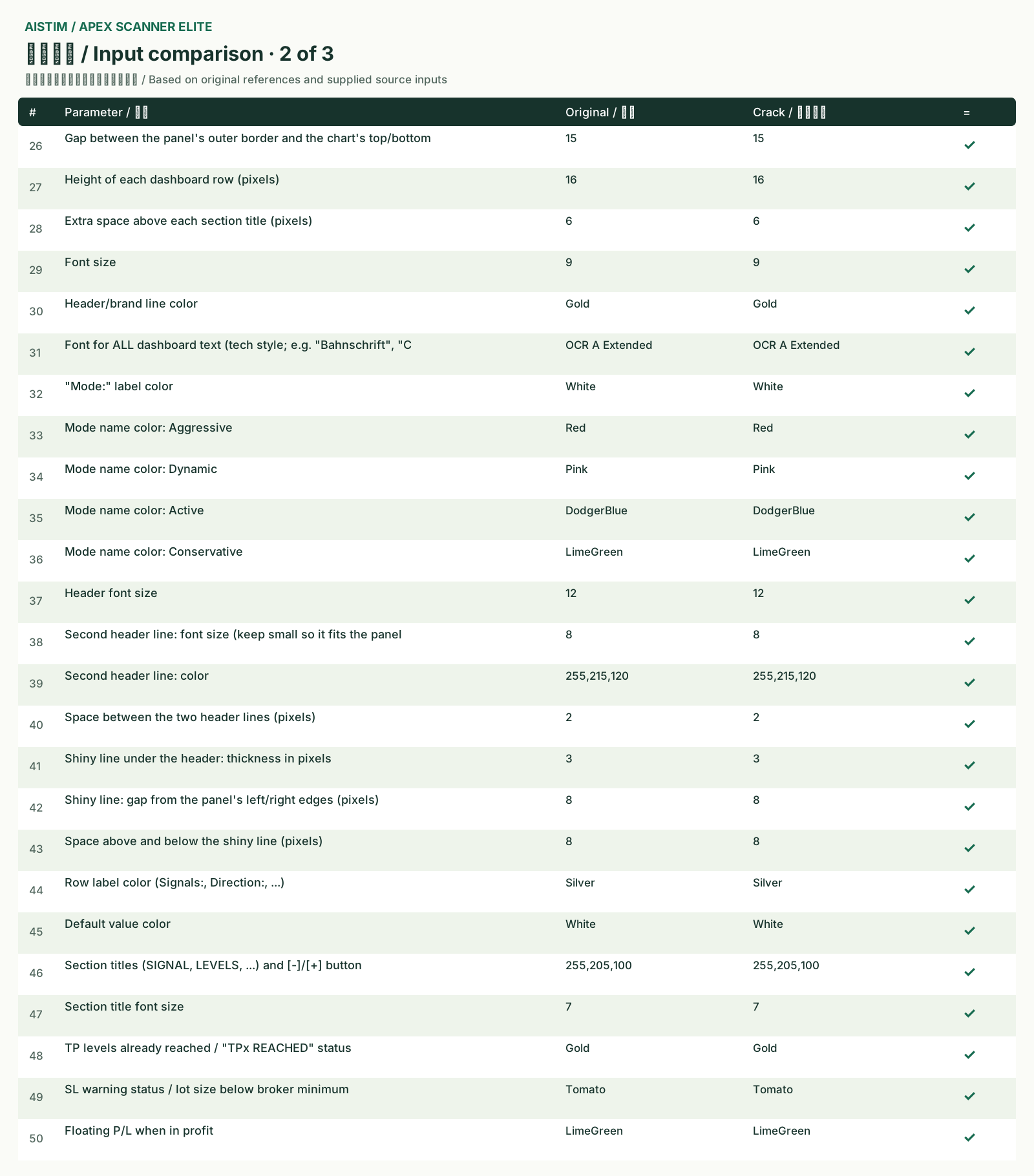
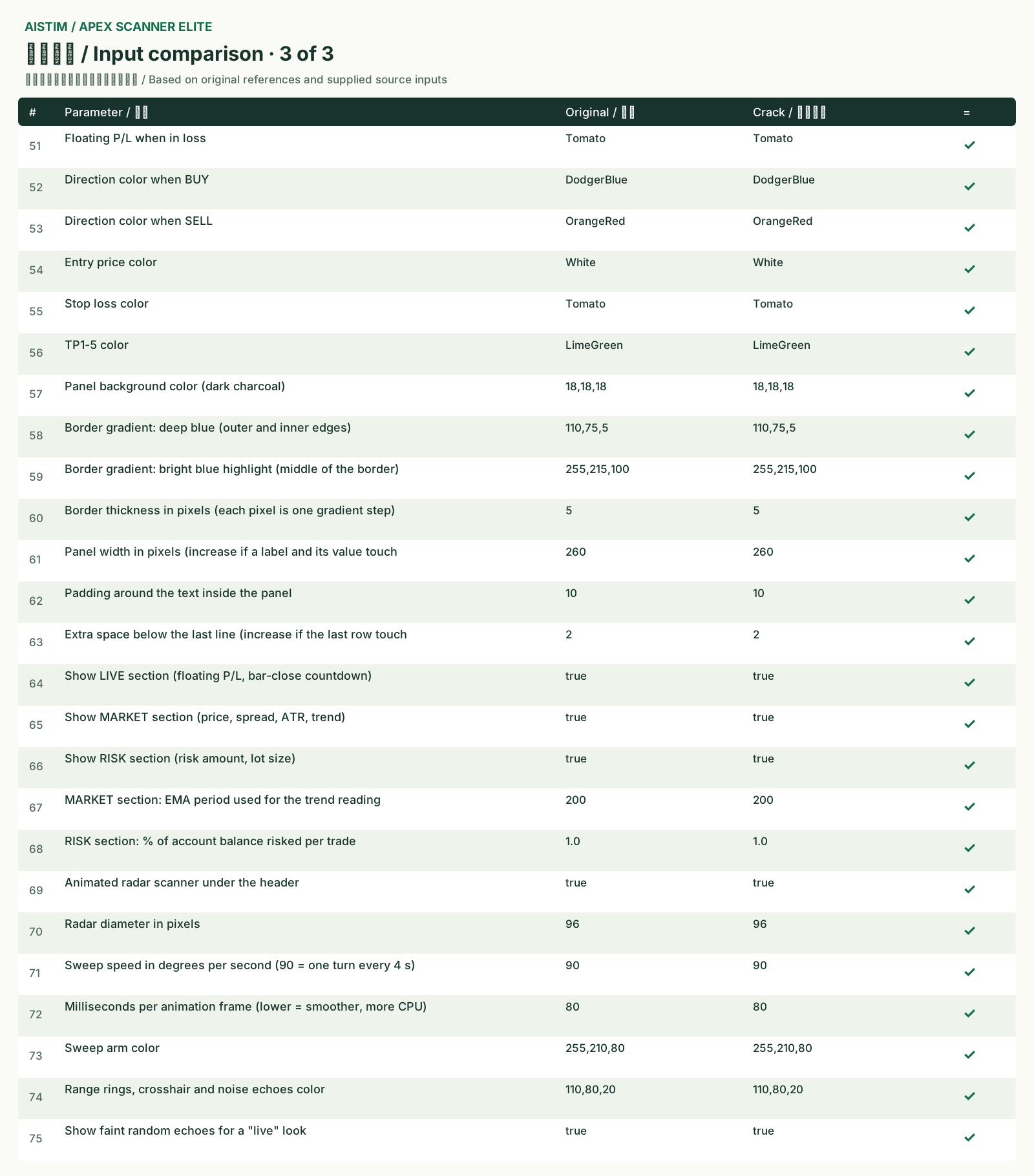
Input comparison · 75
| # | Input comparison | Original | Cracked version | = |
|---|---|---|---|---|
| 1 | Which pattern generates a new signal | 3. Active | 3. Active | Match |
| 2 | Show all signals, Buy only, or Sell only | All signals (Buy and Sell) | All signals (Buy and Sell) | Match |
| 3 | ATR period | 14 | 14 | Match |
| 4 | Extra buffer beyond the stop reference, as a multiple of ATR (w | 1.0 | 1.0 | Match |
| 5 | true = signals appear/retire only on CLOSED candles (no repaint | true | true | Match |
| 6 | How many candles of history are processed when the indicator lo | 500 | 500 | Match |
| 7 | Consecutive closes beyond SL needed to invalidate & look for a | 3 | 3 | Match |
| 8 | Retire the signal (look for a new one) after this many closed c | 150 | 150 | Match |
| 9 | How many bars forward the SL/TP lines extend | 15 | 15 | Match |
| 10 | Popup + sound alert on new signal | true | true | Match |
| 11 | Also send new-signal alerts as push notifications to the MT4 mo | true | true | Match |
| 12 | Alert when the active signal reaches TP1..TP5 or gets an SL war | true | true | Match |
| 13 | AlertSoundFile | alert.wav | alert.wav | Match |
| 14 | Buy arrow / TP line color | DodgerBlue | DodgerBlue | Match |
| 15 | Sell arrow / TP line color | OrangeRed | OrangeRed | Match |
| 16 | Stop loss line color | Red | Red | Match |
| 17 | Wingdings up arrow | 233 | 233 | Match |
| 18 | Wingdings down arrow | 234 | 234 | Match |
| 19 | Entry marker: neon chevrons or classic arrow | Neon chevrons (glowing, animated) | Neon chevrons (glowing, animated) | Match |
| 20 | Neon marker: energy pulse runs through the chevrons | true | true | Match |
| 21 | Neon marker: show BUY / SELL label | true | true | Match |
| 22 | Neon marker size in % (100 = large original, 60 = compact) | 60 | 60 | Match |
| 23 | Show the on-chart info panel | true | true | Match |
| 24 | 0=Top-Left, 1=Top-Right, 2=Bottom-Left, 3=Bottom-Right | 0 | 0 | Match |
| 25 | Gap between the panel's outer border and the chart's side edge | 4 | 4 | Match |
| 26 | Gap between the panel's outer border and the chart's top/bottom | 15 | 15 | Match |
| 27 | Height of each dashboard row (pixels) | 16 | 16 | Match |
| 28 | Extra space above each section title (pixels) | 6 | 6 | Match |
| 29 | Font size | 9 | 9 | Match |
| 30 | Header/brand line color | Gold | Gold | Match |
| 31 | Font for ALL dashboard text (tech style; e.g. "Bahnschrift", "C | OCR A Extended | OCR A Extended | Match |
| 32 | "Mode:" label color | White | White | Match |
| 33 | Mode name color: Aggressive | Red | Red | Match |
| 34 | Mode name color: Dynamic | Pink | Pink | Match |
| 35 | Mode name color: Active | DodgerBlue | DodgerBlue | Match |
| 36 | Mode name color: Conservative | LimeGreen | LimeGreen | Match |
| 37 | Header font size | 12 | 12 | Match |
| 38 | Second header line: font size (keep small so it fits the panel | 8 | 8 | Match |
| 39 | Second header line: color | 255,215,120 | 255,215,120 | Match |
| 40 | Space between the two header lines (pixels) | 2 | 2 | Match |
| 41 | Shiny line under the header: thickness in pixels | 3 | 3 | Match |
| 42 | Shiny line: gap from the panel's left/right edges (pixels) | 8 | 8 | Match |
| 43 | Space above and below the shiny line (pixels) | 8 | 8 | Match |
| 44 | Row label color (Signals:, Direction:, ...) | Silver | Silver | Match |
| 45 | Default value color | White | White | Match |
| 46 | Section titles (SIGNAL, LEVELS, ...) and [-]/[+] button | 255,205,100 | 255,205,100 | Match |
| 47 | Section title font size | 7 | 7 | Match |
| 48 | TP levels already reached / "TPx REACHED" status | Gold | Gold | Match |
| 49 | SL warning status / lot size below broker minimum | Tomato | Tomato | Match |
| 50 | Floating P/L when in profit | LimeGreen | LimeGreen | Match |
| 51 | Floating P/L when in loss | Tomato | Tomato | Match |
| 52 | Direction color when BUY | DodgerBlue | DodgerBlue | Match |
| 53 | Direction color when SELL | OrangeRed | OrangeRed | Match |
| 54 | Entry price color | White | White | Match |
| 55 | Stop loss color | Tomato | Tomato | Match |
| 56 | TP1-5 color | LimeGreen | LimeGreen | Match |
| 57 | Panel background color (dark charcoal) | 18,18,18 | 18,18,18 | Match |
| 58 | Border gradient: deep blue (outer and inner edges) | 110,75,5 | 110,75,5 | Match |
| 59 | Border gradient: bright blue highlight (middle of the border) | 255,215,100 | 255,215,100 | Match |
| 60 | Border thickness in pixels (each pixel is one gradient step) | 5 | 5 | Match |
| 61 | Panel width in pixels (increase if a label and its value touch | 260 | 260 | Match |
| 62 | Padding around the text inside the panel | 10 | 10 | Match |
| 63 | Extra space below the last line (increase if the last row touch | 2 | 2 | Match |
| 64 | Show LIVE section (floating P/L, bar-close countdown) | true | true | Match |
| 65 | Show MARKET section (price, spread, ATR, trend) | true | true | Match |
| 66 | Show RISK section (risk amount, lot size) | true | true | Match |
| 67 | MARKET section: EMA period used for the trend reading | 200 | 200 | Match |
| 68 | RISK section: % of account balance risked per trade | 1.0 | 1.0 | Match |
| 69 | Animated radar scanner under the header | true | true | Match |
| 70 | Radar diameter in pixels | 96 | 96 | Match |
| 71 | Sweep speed in degrees per second (90 = one turn every 4 s) | 90 | 90 | Match |
| 72 | Milliseconds per animation frame (lower = smoother, more CPU) | 80 | 80 | Match |
| 73 | Sweep arm color | 255,210,80 | 255,210,80 | Match |
| 74 | Range rings, crosshair and noise echoes color | 110,80,20 | 110,80,20 | Match |
| 75 | Show faint random echoes for a "live" look | true | true | Match |
All dropdown options
“Very well done. They are identical.”
What was compared
This project checked input captions, order, defaults and dropdown options, together with charts, signal data and historical scenarios. The input-caption revision also received seven native loading regressions.
Any symbol, timeframe and input configuration describes the acceptance target. One BTCUSD M5 image does not exhaust all combinations. Historical checks and continuous demo-account behavior are assessed separately for the agreed version and test scope.
This page presents project results and acceptance information. Customer accounts, source files, core algorithms and internal processing methods are not published.
Common questions
What was compared in this case?
This project checked input captions, order, defaults and dropdown options, together with charts, signal data and historical scenarios. The input-caption revision also received seven native loading regressions. Any symbol, timeframe and input configuration describes the acceptance target. One BTCUSD M5 image does not exhaust all combinations. Historical checks and continuous demo-account behavior are assessed separately for the agreed version and test scope.
How can I discuss a similar project?
Contact us privately with your platform, files or available materials, required features and verification needs. Agree the scope, quote, timing and deliverables before work.
How can I discuss a similar project?
Contact us privately with your platform, files or available materials, required features and verification needs. Agree the scope, quote, timing and deliverables before work.