AISTIM / MT4 / 2026-11-07
Apex Scanner Elite · MT4 / MT5 क्रैकिंग के सफल केस
Apex Scanner Elite: MT4 संकेतक के पैनल, संकेत, मूल्य स्तर, 75 डिफ़ॉल्ट और नौ मेनू विकल्पों की तुलना।
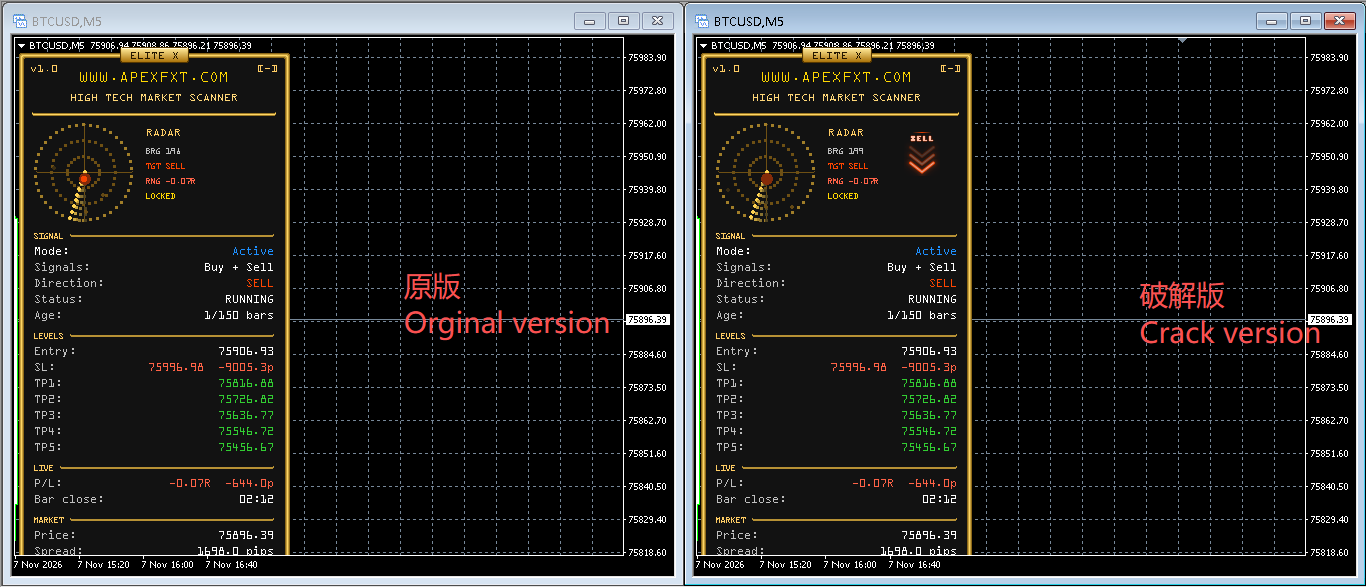
चार्ट तुलना
ग्राहक का BTCUSD M5 चित्र: बाएँ मूल और दाएँ क्रैक किया संस्करण। चित्र बिना बदलाव दिखाया गया है।
इनपुट तुलना
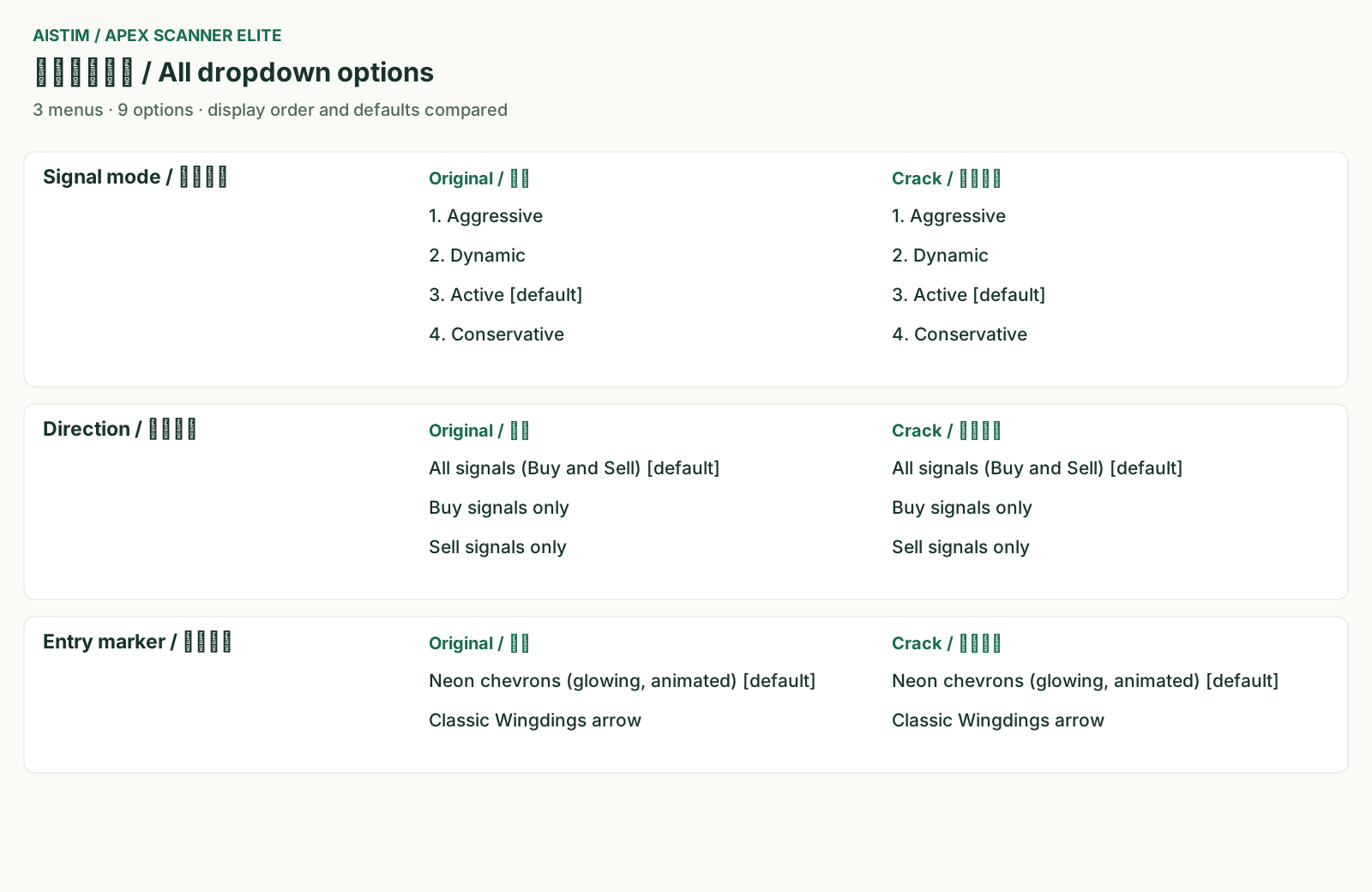
मूल संदर्भ और दिए स्रोत की इनपुट घोषणाओं से तैयार तुलना: 75 मान और नौ विकल्प। मिलान के लिए मूल नाम और मान रखे गए हैं। ये MT4 के वास्तविक सेटिंग संवाद के स्क्रीनशॉट नहीं हैं।
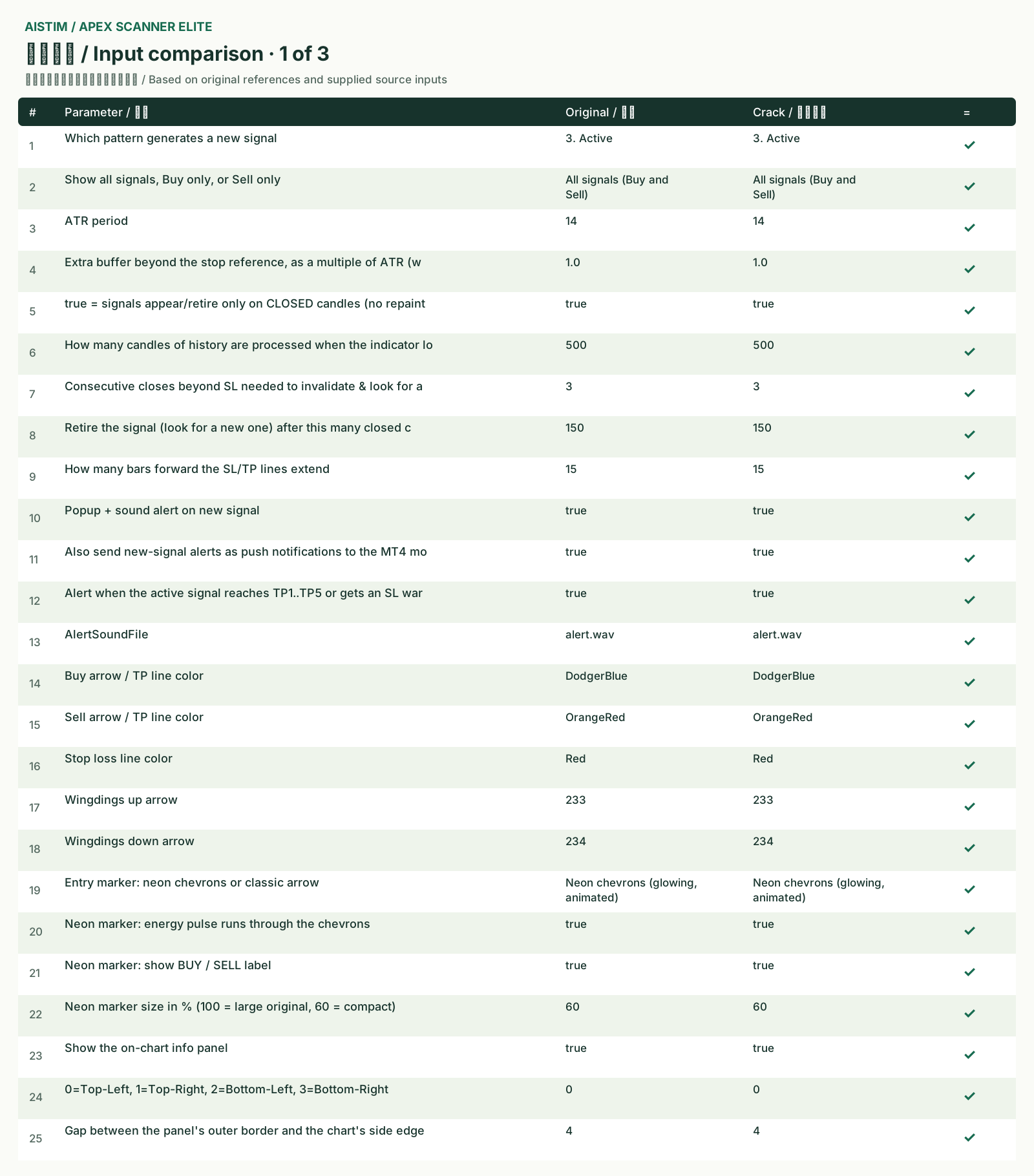
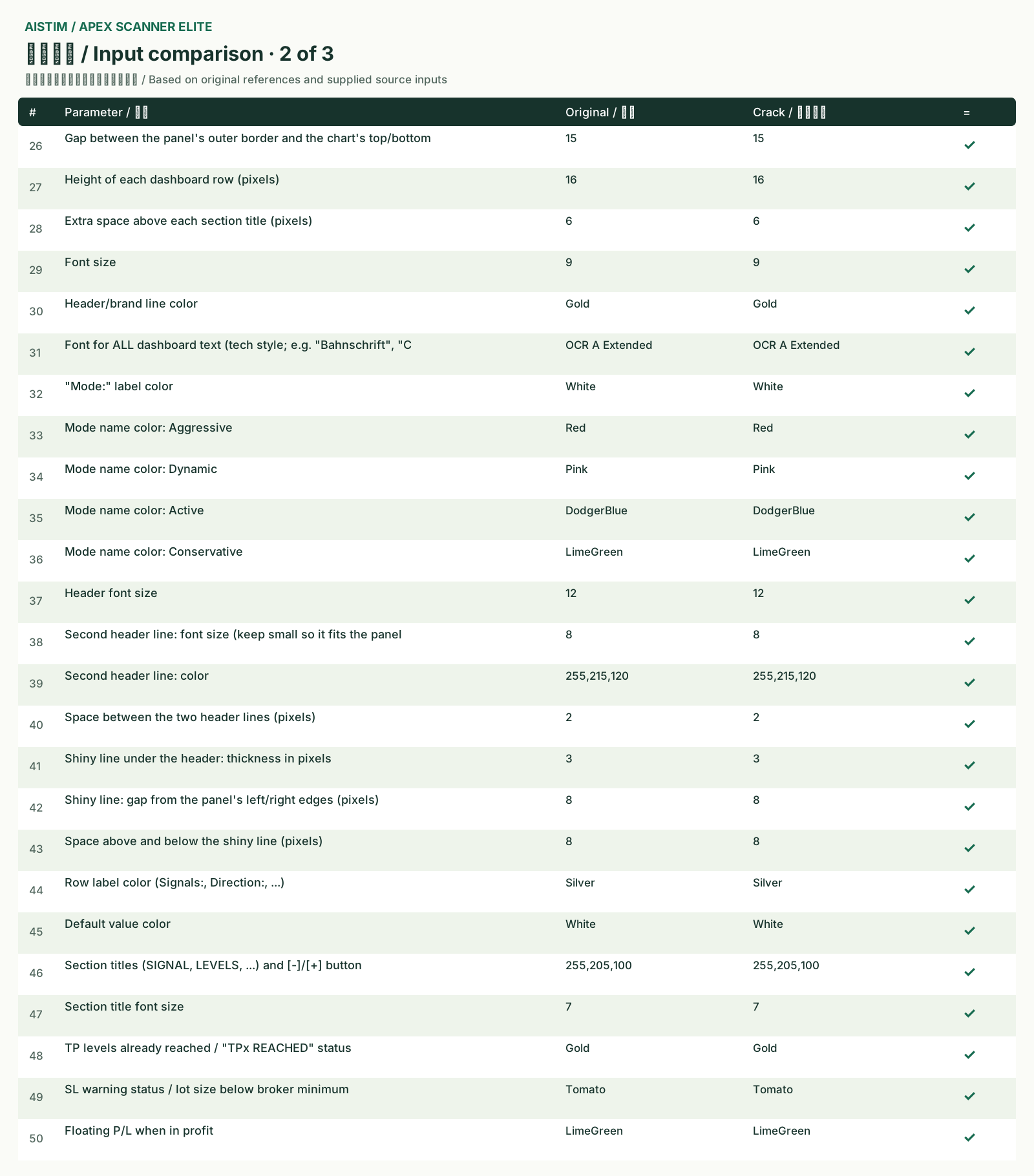
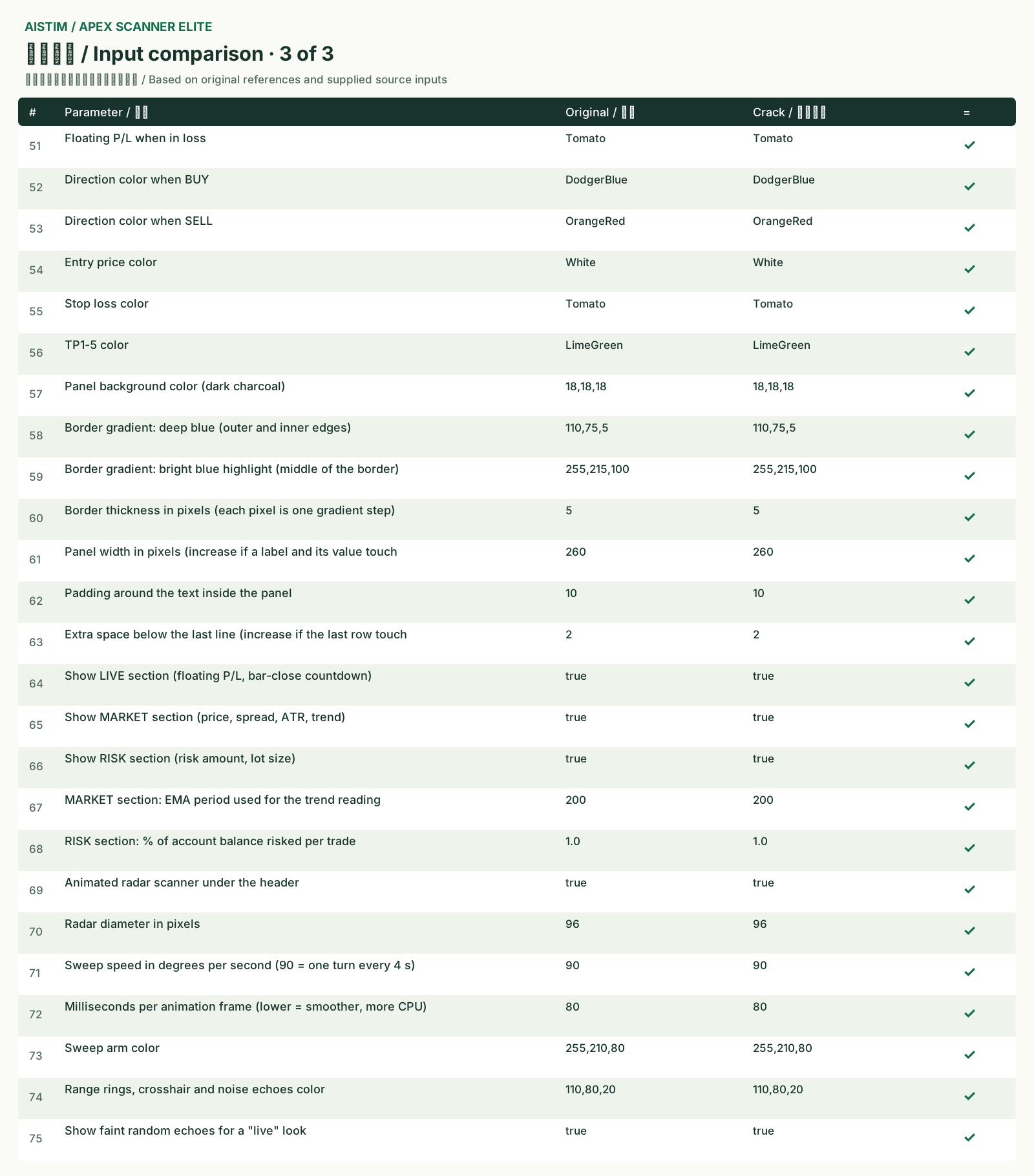
इनपुट तुलना · 75
| # | इनपुट तुलना | मूल | क्रैक किया संस्करण | = |
|---|---|---|---|---|
| 1 | Which pattern generates a new signal | 3. Active | 3. Active | मेल |
| 2 | Show all signals, Buy only, or Sell only | All signals (Buy and Sell) | All signals (Buy and Sell) | मेल |
| 3 | ATR period | 14 | 14 | मेल |
| 4 | Extra buffer beyond the stop reference, as a multiple of ATR (w | 1.0 | 1.0 | मेल |
| 5 | true = signals appear/retire only on CLOSED candles (no repaint | true | true | मेल |
| 6 | How many candles of history are processed when the indicator lo | 500 | 500 | मेल |
| 7 | Consecutive closes beyond SL needed to invalidate & look for a | 3 | 3 | मेल |
| 8 | Retire the signal (look for a new one) after this many closed c | 150 | 150 | मेल |
| 9 | How many bars forward the SL/TP lines extend | 15 | 15 | मेल |
| 10 | Popup + sound alert on new signal | true | true | मेल |
| 11 | Also send new-signal alerts as push notifications to the MT4 mo | true | true | मेल |
| 12 | Alert when the active signal reaches TP1..TP5 or gets an SL war | true | true | मेल |
| 13 | AlertSoundFile | alert.wav | alert.wav | मेल |
| 14 | Buy arrow / TP line color | DodgerBlue | DodgerBlue | मेल |
| 15 | Sell arrow / TP line color | OrangeRed | OrangeRed | मेल |
| 16 | Stop loss line color | Red | Red | मेल |
| 17 | Wingdings up arrow | 233 | 233 | मेल |
| 18 | Wingdings down arrow | 234 | 234 | मेल |
| 19 | Entry marker: neon chevrons or classic arrow | Neon chevrons (glowing, animated) | Neon chevrons (glowing, animated) | मेल |
| 20 | Neon marker: energy pulse runs through the chevrons | true | true | मेल |
| 21 | Neon marker: show BUY / SELL label | true | true | मेल |
| 22 | Neon marker size in % (100 = large original, 60 = compact) | 60 | 60 | मेल |
| 23 | Show the on-chart info panel | true | true | मेल |
| 24 | 0=Top-Left, 1=Top-Right, 2=Bottom-Left, 3=Bottom-Right | 0 | 0 | मेल |
| 25 | Gap between the panel's outer border and the chart's side edge | 4 | 4 | मेल |
| 26 | Gap between the panel's outer border and the chart's top/bottom | 15 | 15 | मेल |
| 27 | Height of each dashboard row (pixels) | 16 | 16 | मेल |
| 28 | Extra space above each section title (pixels) | 6 | 6 | मेल |
| 29 | Font size | 9 | 9 | मेल |
| 30 | Header/brand line color | Gold | Gold | मेल |
| 31 | Font for ALL dashboard text (tech style; e.g. "Bahnschrift", "C | OCR A Extended | OCR A Extended | मेल |
| 32 | "Mode:" label color | White | White | मेल |
| 33 | Mode name color: Aggressive | Red | Red | मेल |
| 34 | Mode name color: Dynamic | Pink | Pink | मेल |
| 35 | Mode name color: Active | DodgerBlue | DodgerBlue | मेल |
| 36 | Mode name color: Conservative | LimeGreen | LimeGreen | मेल |
| 37 | Header font size | 12 | 12 | मेल |
| 38 | Second header line: font size (keep small so it fits the panel | 8 | 8 | मेल |
| 39 | Second header line: color | 255,215,120 | 255,215,120 | मेल |
| 40 | Space between the two header lines (pixels) | 2 | 2 | मेल |
| 41 | Shiny line under the header: thickness in pixels | 3 | 3 | मेल |
| 42 | Shiny line: gap from the panel's left/right edges (pixels) | 8 | 8 | मेल |
| 43 | Space above and below the shiny line (pixels) | 8 | 8 | मेल |
| 44 | Row label color (Signals:, Direction:, ...) | Silver | Silver | मेल |
| 45 | Default value color | White | White | मेल |
| 46 | Section titles (SIGNAL, LEVELS, ...) and [-]/[+] button | 255,205,100 | 255,205,100 | मेल |
| 47 | Section title font size | 7 | 7 | मेल |
| 48 | TP levels already reached / "TPx REACHED" status | Gold | Gold | मेल |
| 49 | SL warning status / lot size below broker minimum | Tomato | Tomato | मेल |
| 50 | Floating P/L when in profit | LimeGreen | LimeGreen | मेल |
| 51 | Floating P/L when in loss | Tomato | Tomato | मेल |
| 52 | Direction color when BUY | DodgerBlue | DodgerBlue | मेल |
| 53 | Direction color when SELL | OrangeRed | OrangeRed | मेल |
| 54 | Entry price color | White | White | मेल |
| 55 | Stop loss color | Tomato | Tomato | मेल |
| 56 | TP1-5 color | LimeGreen | LimeGreen | मेल |
| 57 | Panel background color (dark charcoal) | 18,18,18 | 18,18,18 | मेल |
| 58 | Border gradient: deep blue (outer and inner edges) | 110,75,5 | 110,75,5 | मेल |
| 59 | Border gradient: bright blue highlight (middle of the border) | 255,215,100 | 255,215,100 | मेल |
| 60 | Border thickness in pixels (each pixel is one gradient step) | 5 | 5 | मेल |
| 61 | Panel width in pixels (increase if a label and its value touch | 260 | 260 | मेल |
| 62 | Padding around the text inside the panel | 10 | 10 | मेल |
| 63 | Extra space below the last line (increase if the last row touch | 2 | 2 | मेल |
| 64 | Show LIVE section (floating P/L, bar-close countdown) | true | true | मेल |
| 65 | Show MARKET section (price, spread, ATR, trend) | true | true | मेल |
| 66 | Show RISK section (risk amount, lot size) | true | true | मेल |
| 67 | MARKET section: EMA period used for the trend reading | 200 | 200 | मेल |
| 68 | RISK section: % of account balance risked per trade | 1.0 | 1.0 | मेल |
| 69 | Animated radar scanner under the header | true | true | मेल |
| 70 | Radar diameter in pixels | 96 | 96 | मेल |
| 71 | Sweep speed in degrees per second (90 = one turn every 4 s) | 90 | 90 | मेल |
| 72 | Milliseconds per animation frame (lower = smoother, more CPU) | 80 | 80 | मेल |
| 73 | Sweep arm color | 255,210,80 | 255,210,80 | मेल |
| 74 | Range rings, crosshair and noise echoes color | 110,80,20 | 110,80,20 | मेल |
| 75 | Show faint random echoes for a "live" look | true | true | मेल |
सभी मेनू विकल्प
“बहुत अच्छा बनाया। बिल्कुल एक जैसे हैं।”
जाँच का दायरा
लेबल, क्रम, डिफ़ॉल्ट, विकल्प, चार्ट, संकेत डेटा और ऐतिहासिक स्थितियाँ जाँची गईं। संशोधित लेबल संस्करण पर प्लेटफ़ॉर्म में सात लोडिंग जाँच भी हुईं।
हर प्रतीक, समयावधि और सेटिंग पर 100% मेल स्वीकृति का लक्ष्य है। एक BTCUSD M5 चित्र सभी संयोजनों का प्रमाण नहीं है। 100% जाँचे डिफ़ॉल्ट को दर्शाता है; लगातार डेमो संचालन अलग सहमत दायरे में जाँचा जाता है।
ग्राहक खाते, स्रोत, मुख्य एल्गोरिदम और अंदरूनी तरीके प्रकाशित नहीं होते।
सामान्य प्रश्न
इस केस में क्या तुलना हुई?
लेबल, क्रम, डिफ़ॉल्ट, विकल्प, चार्ट, संकेत डेटा और ऐतिहासिक स्थितियाँ जाँची गईं। संशोधित लेबल संस्करण पर प्लेटफ़ॉर्म में सात लोडिंग जाँच भी हुईं। हर प्रतीक, समयावधि और सेटिंग पर 100% मेल स्वीकृति का लक्ष्य है। एक BTCUSD M5 चित्र सभी संयोजनों का प्रमाण नहीं है। 100% जाँचे डिफ़ॉल्ट को दर्शाता है; लगातार डेमो संचालन अलग सहमत दायरे में जाँचा जाता है।
ऐसे प्रोजेक्ट के लिए कैसे पूछें?
प्लेटफ़ॉर्म, फ़ाइलें या सामग्री, सुविधाएँ और जाँच की ज़रूरतें निजी संपर्क में बताएँ। काम से पहले दायरा, कीमत, समय और डिलीवरी तय करें।
ऐसे प्रोजेक्ट के लिए कैसे पूछें?
प्लेटफ़ॉर्म, फ़ाइलें या सामग्री, सुविधाएँ और जाँच की ज़रूरतें निजी संपर्क में बताएँ। काम से पहले दायरा, कीमत, समय और डिलीवरी तय करें।