MultiMarket · v3.10 · Working product · Free to use · Windows / MT5
MultiMarket: Free Binance & OKX Spot Data Tool for MT5
MultiMarket brings public Binance and OKX spot data into MT5 custom symbols. Switch exchange, pair and timeframe in familiar native candlestick charts and apply indicators for chart analysis. One standalone Windows receiver and one controller EA manage multiple chart windows.
See the product running
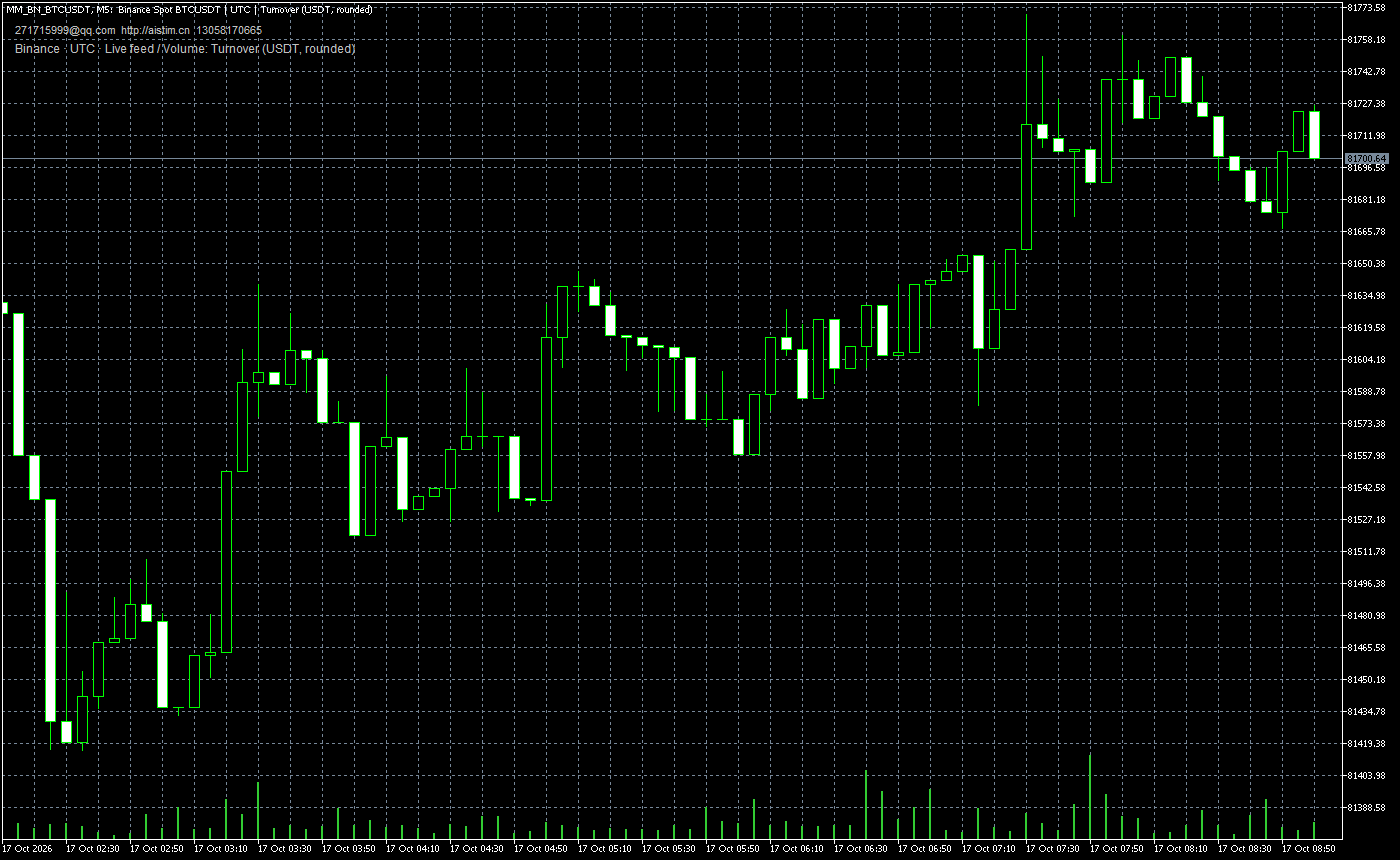
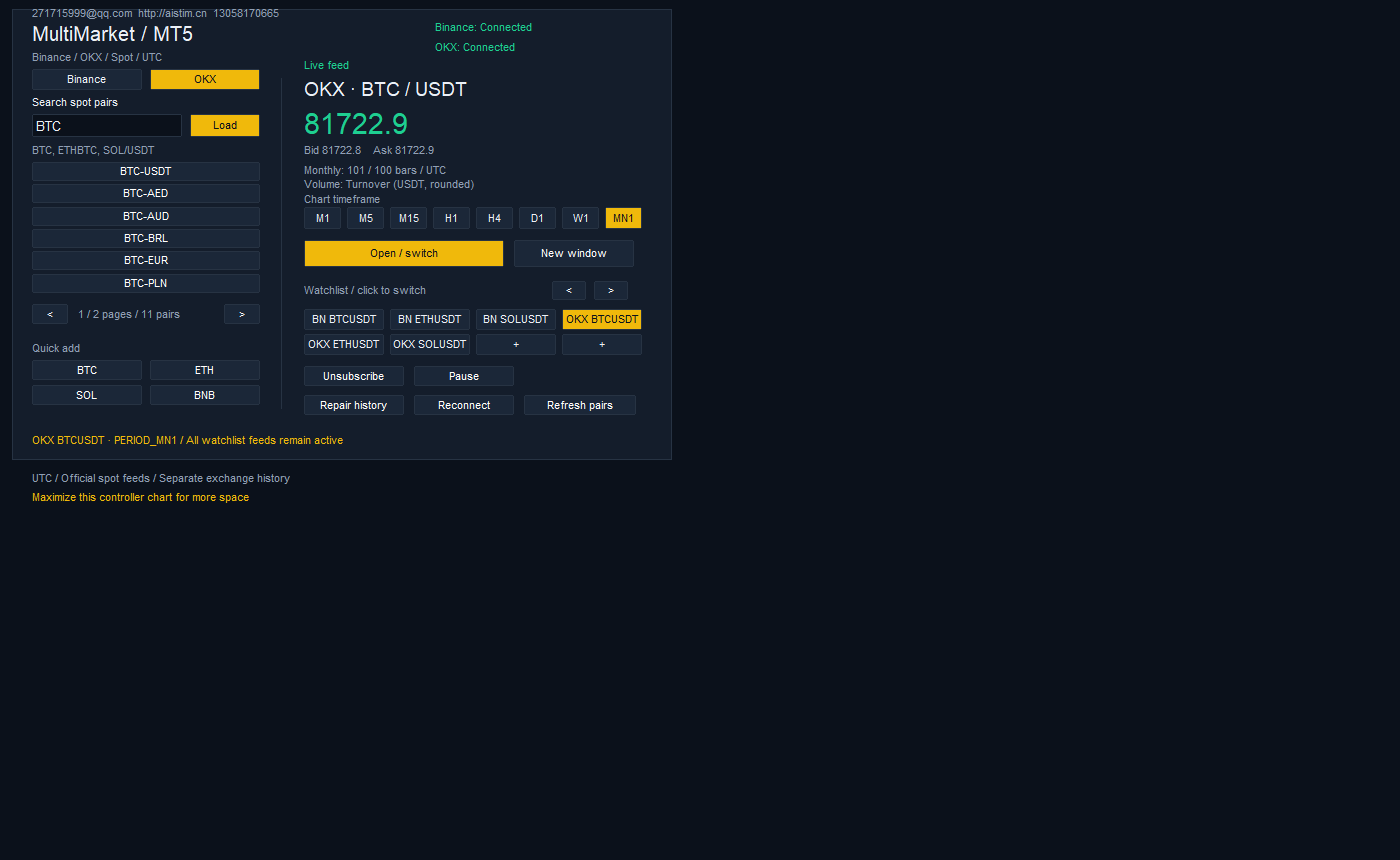
These are actual application screenshots. Prices and connection status are historical examples; this page does not stream live quotes. Use the contact section on this page for current contact details.
From spot feeds to native chart analysis
Two spot exchanges
Binance Spot and OKX Spot keep prices, history and connection status separate. Search instruments, save a watchlist and switch exchanges.
Multiple pairs and charts
One receiver and one controller manage multiple chart windows. Open an additional window for a separate view; other charts do not need another EA.
M1 through MN1
Choose M1, M5, M15, H1, H4, D1, W1 or MN1. Daily, weekly and monthly history each target 100 closed candles plus the current candle, subject to exchange availability.
Native indicators and controls
Use indicators, zoom and timeframe controls in native MT5 charts. Volume bars represent quote-currency turnover; the chart shows the unit.
Reconnect and cached history
Automatic reconnect, candle repair, saved watchlists and cached history are included. Candle repair cannot recreate every trade tick missed during a disconnect.
Chinese and English editions
Separate EXE / EA pairs are provided. The receiver detects running MT5 terminals and known data folders; manual folder selection is also available.
Start in four steps
Download and extract
Choose the Chinese or English release package, extract it completely and open the desktop MT5 terminal you want to use.
Install the matching controller
Run the receiver EXE in your chosen language, check the detected MT5 data folder and install. Choose the correct terminal when several are listed, or select its folder manually.
Attach one controller
Refresh Expert Advisors in MT5 Navigator and attach the matching MultiMarket controller to one ordinary chart. Use one controller per terminal and keep the receiver running.
Load a pair and open its chart
Search for a spot pair, load it, open or switch its chart, then select a timeframe. Other chart windows do not need an additional controller EA.
Requirements and data conventions
- Windows 10 / 11 x64, .NET Framework 4.8 and desktop MetaTrader 5.
- Both exchange REST and WebSocket endpoints must work on the target network. Test availability in your region and network.
- No exchange API key, trading login, DLL imports or order permissions are required.
- This release supports Binance / OKX spot only. MT4, futures and perpetual swaps are not included. It does not execute trades.
Candle times are UTC. Daily and monthly bars use official UTC data; weekly bars use MT5’s Sunday 00:00 UTC boundary and may differ from Monday-start exchange charts. When history is limited, the actual count is shown; earlier data is not fabricated.
Get MultiMarket v3.10 free
This website provides information in 15 languages. The application has Chinese and English editions; use a receiver EXE and EA in the same language.
Chinese and English application editions are available. Contact AISTIM and specify your preferred edition to receive the free package, instructions and checksum information. GitHub project, documentation, release and feedback links remain available; repository access may be required.
Questions before downloading
Is it free, and is the source public?
The compiled v3.10 application is free to use; source code is private. The public repository provides information, screenshots, manuals and feedback. Follow the included license for use and redistribution of the original package.
Does it trade, or work with MT4?
This version displays public spot data in MT5. It has no order-execution feature and is not an automated trading strategy EA. MT4, futures and perpetual swaps are outside this release.
Do I need a Binance or OKX API key?
No exchange API key or trading login is needed. The receiver needs access to public exchange REST and WebSocket endpoints; website access alone does not confirm feed connectivity.
Why are there fewer than 100 higher-timeframe bars, or different weekly bars?
History depends on the pair’s listing date and the exchange’s available data. Actual counts are shown without fabricated earlier bars. Weekly bars use MT5’s Sunday 00:00 UTC boundary; align periods before comparing.
How do I upgrade or change the application language?
Exit the old receiver from its tray menu and remove its controller. Install the matching language edition, refresh Navigator and reattach. Use one language pair and one controller per MT5 terminal; existing watchlists and history are retained.
Does closing the receiver window stop the feed?
Closing the status window or pressing Esc hides it to the tray. Choose Exit receiver to stop it. Keep the controller chart open too. Check connection and data-freshness status rather than assuming a cached, static chart is live.
Need another market-data source or a custom MT4 / MT5 tool?
Tell AISTIM about your data source, platform, required functions and environment. This product is free to use; additional integrations, EA / indicator development, deployment and dedicated support can be discussed separately.
Discuss custom development with AISTIMMultiMarket is an independent product, not affiliated with or endorsed by Binance, OKX or MetaQuotes.