MT4-047 · MT4
Fibonacci 8-in-1 Indicator · MT4
Overview
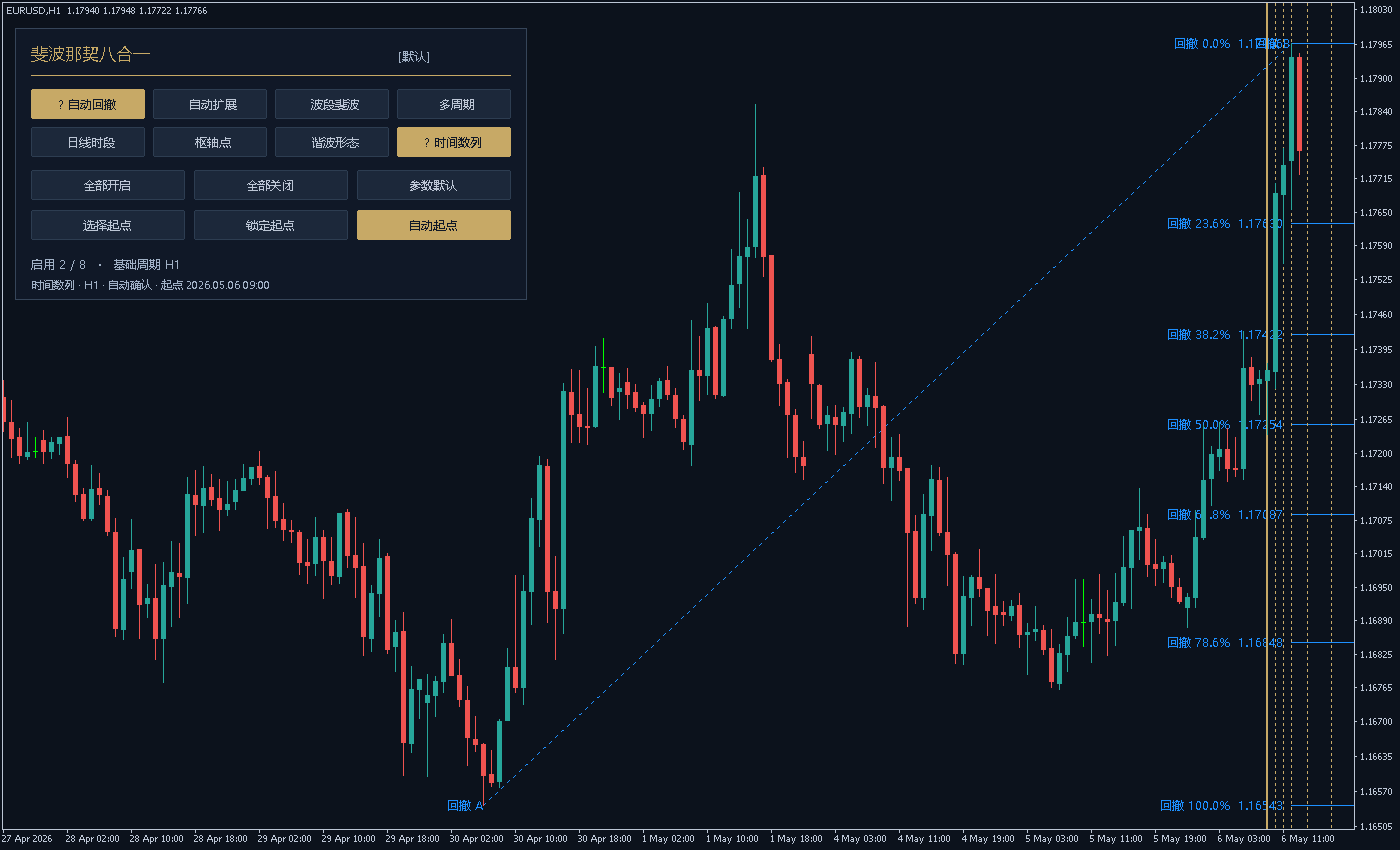
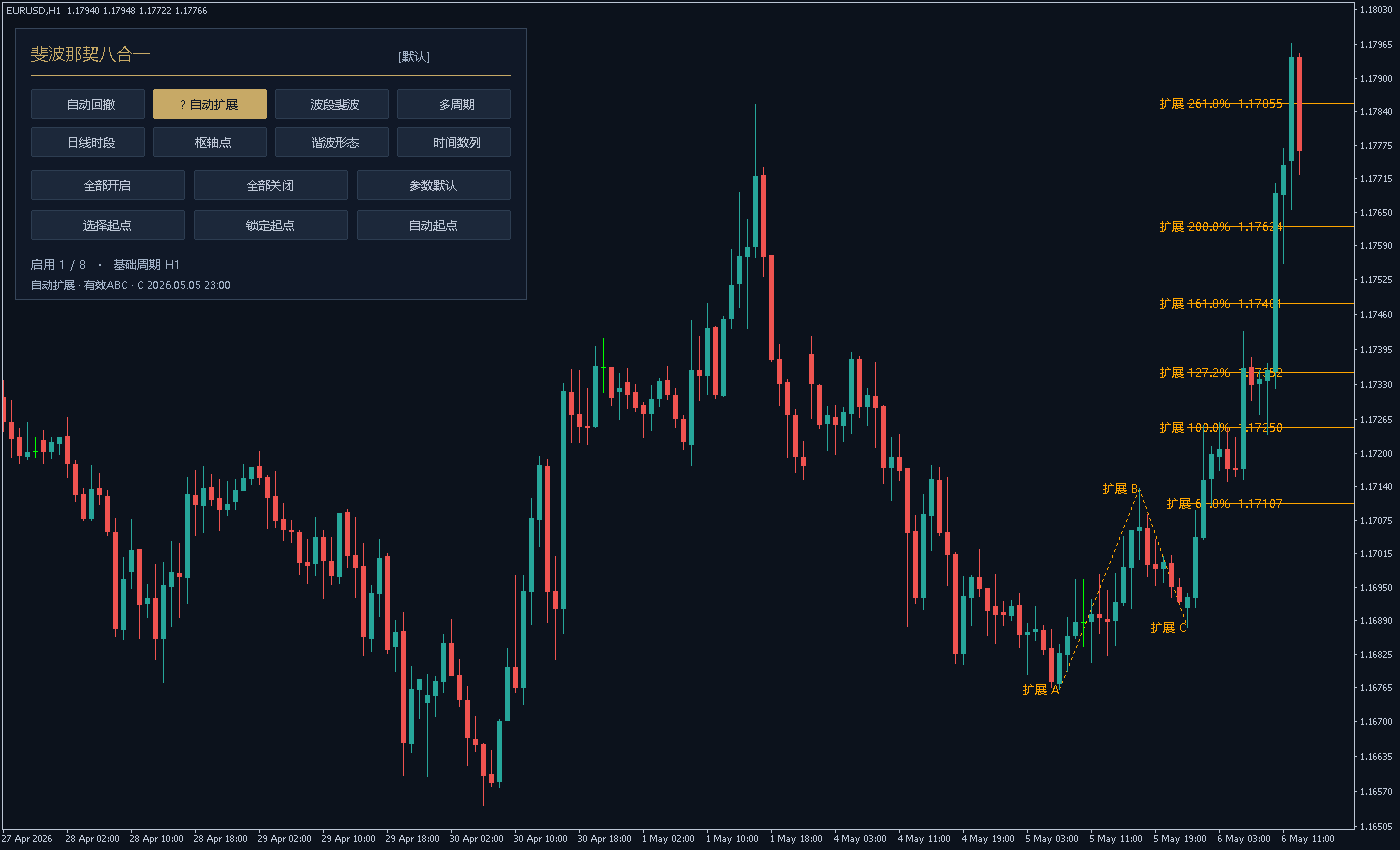
Combine retracement, extension, swings, multiple timeframes, daily sessions, pivots, harmonics and time numbers with eight independent switches.
Automatic confirmed anchors and manual time origins. Edit levels as lists such as 0,23.6,38.2,50,61.8. The navy-and-gold panel shows module status and ABC selection details. Chart analysis only; no automatic orders.
1. Indicator in use
2. Parameter settings
| Parameter | Default | How to use |
|---|---|---|
| InpMode | Default Custom | How to use Initial display mode: custom switches, one module, or all eight. |
| InpRetrace | Default On | How to use Enable automatic retracement at initialization. |
| InpExtend | Default Off | How to use Enable automatic ABC extension at initialization. |
| InpSwing | Default Off | How to use Enable the latest-confirmed-swing retracement module. |
| InpMTF | Default Off | How to use Enable the multi-timeframe retracement module. |
| InpSession | Default Off | How to use Enable daily/weekly/custom-session retracement. |
| InpPivot | Default Off | How to use Enable Fibonacci pivot points. |
| InpHarmonic | Default Off | How to use Enable completed harmonic-pattern recognition. |
| InpTime | Default On | How to use Enable Fibonacci integer time intervals. |
| InpCalcTF | Default Chart period | How to use Base series for retracement, extension, swing and harmonics. |
| InpInstance | Default 默认 | How to use Unique instance name on the same chart; 1-12 characters. |
| InpClosedOnly | Default On | How to use Range anchors use closed bars only; confirmed turns always require closed bars. |
| InpHistory | Default 1500 | How to use Maximum bars to load per relevant series, 50-20000. |
| InpRetraceMethod | Default Range high/low | How to use Retracement anchors: range high/low, confirmed swings, or fractals. |
| InpExtendMethod | Default Confirmed swings | How to use Extension anchors: confirmed swings or fractals. |
| InpSwingMethod | Default Confirmed swings | How to use Swing-module anchors: confirmed swings or fractals. |
| InpRangeBars | Default 120 | How to use High/low lookback for range anchoring, from 2 to InpHistory. |
| InpZZDepth | Default 5 | How to use Left/right closed confirmation bars for swing detection, 1-100. |
| InpZZDeviation | Default 0 | How to use Minimum swing price distance in quote points; zero disables the filter. |
| InpZZMinBars | Default 3 | How to use Minimum spacing between alternating swing anchors; at least 1 bar. |
| InpFractalWing | Default 2 | How to use Left/right confirmation bars for fractal detection, 1-100. |
| InpReverse | Default Off | How to use Reverse 0% and 100% in all retracement-based modules. |
| InpRetraceLevels | Default 0, 23.6, 38.2, 50, 61.8, 78.6, 100 | How to use Percentage list shared by retracement, swing, multi-timeframe and sessions. |
| InpExtendLevels | Default 61.8, 100, 127.2, 161.8, 200, 261.8 | How to use Automatic-extension percentage list. For example, 161.8 means ratio 1.618. |
| InpMTFMethod | Default Confirmed swings | How to use Common anchor method for the enabled multi-timeframe groups. |
| InpTF1Enabled | Default On | How to use Show multi-timeframe group 1 when the parent module is enabled. |
| InpTF1 | Default H1 | How to use Calculation timeframe of group 1. |
| InpTF2Enabled | Default On | How to use Show multi-timeframe group 2 when the parent module is enabled. |
| InpTF2 | Default H4 | How to use Calculation timeframe of group 2. |
| InpTF3Enabled | Default On | How to use Show multi-timeframe group 3 when the parent module is enabled. |
| InpTF3 | Default D1 | How to use Calculation timeframe of group 3; duplicate resolved periods are not repeated. |
| InpSessionMethod | Default Previous day | How to use Previous completed day, week, or custom session. |
| InpSessionStart | Default 08:00 | How to use Custom-session start in server time, HH:MM. |
| InpSessionEnd | Default 17:00 | How to use Custom-session end in server time, HH:MM; may cross midnight. |
| InpPivotTF | Default D1 | How to use Use the previous completed bar in this pivot timeframe. |
| InpPivotLevels | Default 38.2, 61.8, 100 | How to use Positive ascending pivot percentages; P is included automatically. |
| InpHarmonicMethod | Default Confirmed fractals | How to use Harmonic anchors: confirmed swings or confirmed fractals. |
| InpTolerance | Default 8 | How to use Relative percentage tolerance around harmonic ratio conditions, 0-20. |
| InpMaxPatterns | Default 3 | How to use Maximum completed harmonic structures to display, 1-20. |
| InpABCD | Default On | How to use Enable the equal-leg ABCD template. |
| InpGartley | Default On | How to use Enable the Gartley template. |
| InpBat | Default On | How to use Enable the Bat template. |
| InpButterfly | Default On | How to use Enable the Butterfly template. |
| InpCrab | Default On | How to use Enable the Crab template. |
| InpTimeTF | Default Chart period | How to use Independent timeframe used to count time-number bars. |
| InpTimeMode | Default Automatic | How to use Automatic confirmed-turn origin or manual origin. |
| InpTimeMethod | Default Confirmed fractals | How to use Automatic time-origin anchors: swings or fractals. |
| InpTimeAnchor | Default Latest high/low | How to use Automatic origin type: latest high/low, high only, or low only. |
| InpTimeLock | Default Off | How to use Initial lock of the automatic time origin. |
| InpTimeStart | Default 0 | How to use Manual server date/time; zero enters chart selection in manual mode. |
| InpTimeCount | Default 10 | How to use Number of displayed integer terms, 3-15; origin 0 is additional. |
| InpTimeUnitBars | Default 1 | How to use Multiply every Fibonacci integer by this spacing, 1-10 bars. |
| InpTimeColor | Default C'199,169,102' | How to use Time-origin line, integer time lines and labels. |
| InpPanel | Default On | How to use Show the eight-module panel; hidden panel does not disable calculations. |
| InpPanelX | Default 12 | How to use Panel offset from the chart left edge in pixels; non-negative. |
| InpPanelY | Default 25 | How to use Panel offset from the chart upper edge in pixels; non-negative. |
| InpLabels | Default On | How to use Show percentage/price labels, time numbers and pattern point labels. |
| InpAnchorLeg | Default On | How to use Show retracement AB and extension ABC anchor connections. |
| InpRayRight | Default On | How to use Extend price reference lines toward the right. |
| InpLineWidth | Default 1 | How to use Primary price-line width, 1-5. |
| InpFontSize | Default 9 | How to use Drawing label size, 6-24. |
| InpRetraceColor | Default DodgerBlue | How to use Automatic-retracement drawing color. |
| InpExtendColor | Default Orange | How to use Automatic-extension drawing color. |
| InpSwingColor | Default MediumPurple | How to use Swing-retracement drawing color. |
| InpTF1Color | Default DeepSkyBlue | How to use Multi-timeframe group 1 color. |
| InpTF2Color | Default Gold | How to use Multi-timeframe group 2 color. |
| InpTF3Color | Default HotPink | How to use Multi-timeframe group 3 color. |
| InpSessionColor | Default DarkTurquoise | How to use Daily/session drawing color. |
| InpPivotColor | Default Silver | How to use Pivot drawing color. |
| InpBullColor | Default LimeGreen | How to use Harmonic color for patterns with a low D point. |
| InpBearColor | Default Tomato | How to use Harmonic color for patterns with a high D point. |
Installation and use
Place the indicator file in the terminal’s MQL4 / MQL5 → Indicators folder, refresh Navigator, then drag it onto a chart.
Free Chinese-English user manual
One 34-page bilingual PDF covers all eight methods, strengths and limitations, module-specific controls, all 71 settings and real platform screenshots. Free without purchase or sign-in.
Chinese-English user manual · Free PDF ↓
Free PDF. Contact AISTIM before purchase to confirm the delivered software edition.
¥20.00
Indicator file delivery with installation and usage guidance.
Ask about this productTelegram
@alonginchinaPhone
+86 130 5817 0665