MT4-046 · MT4
ARCHER Arrow Signal Indicator · MT4
Overview
Buy/sell arrows, signal dashboard and ATR reference levels, with91 inputs and alternating/consecutive signal modes.
A chart indicator, not an automated trader. Centered smoothing introduces historical look-ahead bias; arrow-pairing statistics are not a live win-rate claim.
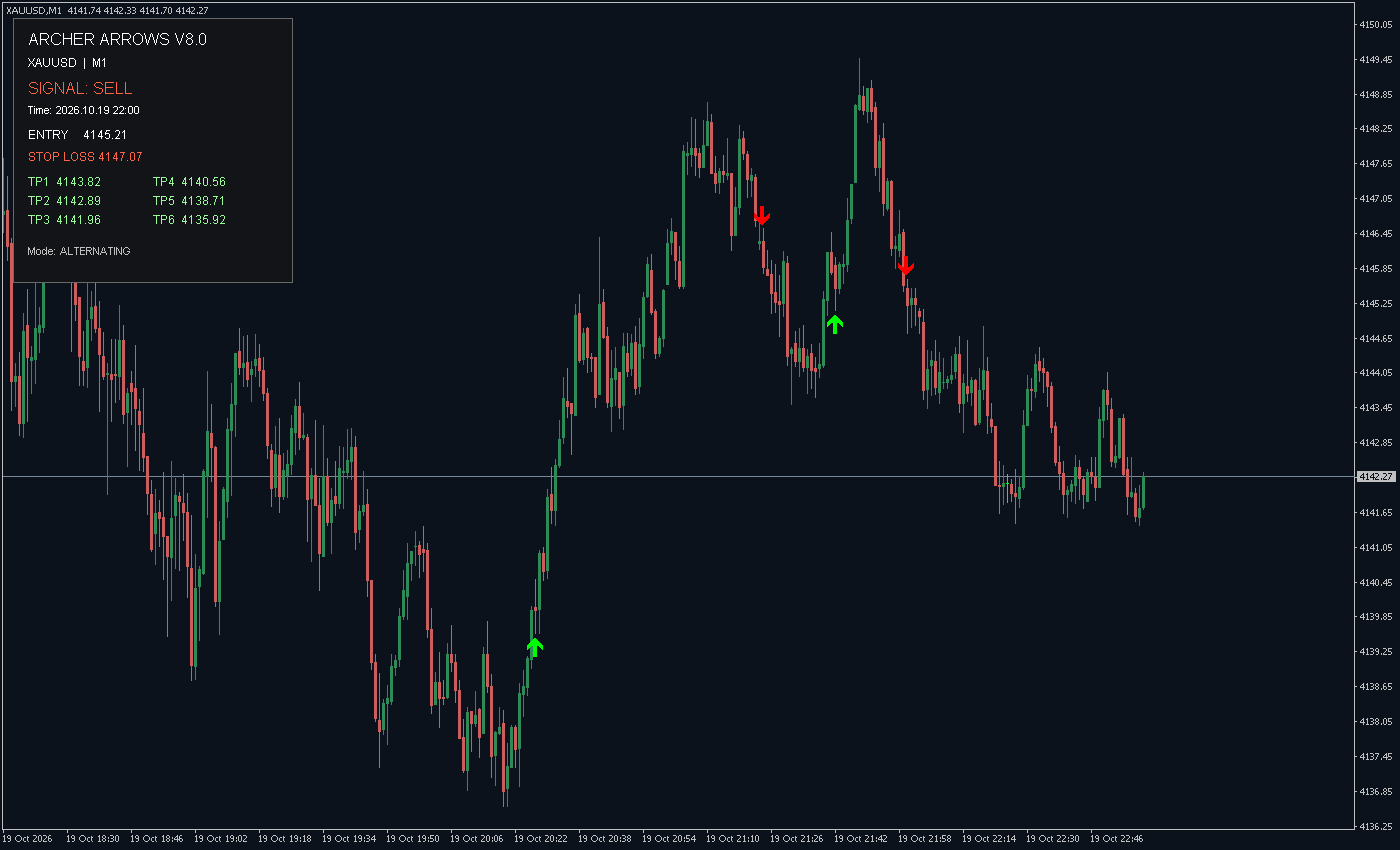
1. Indicator in use
2. Parameter settings
| Parameter | Default | How to use |
|---|---|---|
| MaxBars | Default 1000 | How to use Maximum history window for signals |
| RsiLength | Default 14 | How to use Core RSI period |
| RsiPrice | Default PRICE_CLOSE | How to use Applied price of core RSI |
| Level | Default 30 | How to use Thresholds at Level and 100-Level |
| TMA_FILTER_SETTINGS | Default === TMA FILTER SETTINGS === | How to use Input section/mode description; no signal calculation effect |
| UseTMAFilter | Default true | How to use Enable centered TMA position filter |
| FLAT_FILTER_SETTINGS | Default === FLAT MARKET FILTER === | How to use Input section/mode description; no signal calculation effect |
| UseFlatFilter | Default false | How to use Enable ADX strength threshold |
| FlatADXPeriod | Default 14 | How to use ADX period for flat-market filter |
| FlatADXLevel | Default 25 | How to use Minimum ADX strength |
| RSI_FILTER_SETTINGS | Default === RSI FILTER SETTINGS === | How to use Input section/mode description; no signal calculation effect |
| UseRSIFilter | Default false | How to use Enable additional RSI filter |
| RSIFilterPeriod | Default 14 | How to use Compatibility input; additional filter currently uses fixed period 14 |
| RSI_MODE_INFO | Default 1=Zone, 2=Momentum, 3=Both | How to use Input section/mode description; no signal calculation effect |
| RSIFilterMode | Default 3 | How to use 1=Zone, 2=Momentum, 3=Both |
| RSI_ZONE_SETTINGS | Default --- Zone Filter --- | How to use Input section/mode description; no signal calculation effect |
| RSIBuyMinZone | Default 20.0 | How to use Lower RSI bound for buys |
| RSIBuyMaxZone | Default 55.0 | How to use Upper RSI bound for buys |
| RSISellMinZone | Default 45.0 | How to use Lower RSI bound for sells |
| RSISellMaxZone | Default 80.0 | How to use Upper RSI bound for sells |
| RSI_MOMENTUM_SETTINGS | Default --- Momentum Filter --- | How to use Input section/mode description; no signal calculation effect |
| RSIMomentumBars | Default 3 | How to use RSI momentum comparison interval |
| RSIMomentumThreshold | Default 2.0 | How to use Minimum RSI change in signal direction |
| SIGNAL_MODE_SETTINGS | Default === SIGNAL MODE === | How to use Input section/mode description; no signal calculation effect |
| SignalMode | Default ARCHER_ALTERNATING | How to use Alternating or consecutive signals |
| MinSignalDistance | Default 10 | How to use Time separation in chart-period units; consecutive mode minimum 20 |
| ARROW_SETTINGS | Default === ARROW SETTINGS === | How to use Input section/mode description; no signal calculation effect |
| BuyArrowColor | Default 65280 | How to use Buy-arrow color |
| SellArrowColor | Default 255 | How to use Sell-arrow color |
| BuyArrowSize | Default 2 | How to use Buy-arrow width, 1-5 |
| SellArrowSize | Default 2 | How to use Sell-arrow width, 1-5 |
| ArrowGap | Default 20 | How to use Arrow offset from high/low, in symbol points |
| ALERT_SETTINGS | Default === ALERT SETTINGS === | How to use Input section/mode description; no signal calculation effect |
| AlertsOn | Default true | How to use Popup alerts; other notification switches are independent |
| AlertsSound | Default true | How to use Sound alerts |
| AlertsEmail | Default true | How to use Email alerts; terminal email configuration required |
| AlertsMobile | Default true | How to use Mobile push; MetaQuotes ID configuration required |
| MACD_FILTER_SETTINGS | Default === MACD FILTER === | How to use Input section/mode description; no signal calculation effect |
| UseMACDFilter | Default false | How to use Enable MACD direction filter |
| MACDFast | Default 12 | How to use MACD fast EMA period |
| MACDSlow | Default 26 | How to use MACD slow EMA period |
| MACDSignal | Default 9 | How to use MACD signal-line period |
| MACDPrice | Default PRICE_CLOSE | How to use MACD applied price |
| WILLIAMS_FILTER_SETTINGS | Default === WILLIAMS %R FILTER === | How to use Input section/mode description; no signal calculation effect |
| UseWilliamsFilter | Default false | How to use Enable Williams %R filter |
| WilliamsPeriod | Default 14 | How to use Williams %R period |
| WilliamsBuyLevel | Default -80.0 | How to use Buy %R threshold |
| WilliamsSellLevel | Default -20.0 | How to use Sell %R threshold |
| EMA_FILTER_SETTINGS | Default === EMA FILTER === | How to use Input section/mode description; no signal calculation effect |
| UseEMAFilter | Default false | How to use Compatibility switch; current version suppresses signals when enabled |
| EMAFilterPeriod | Default 200 | How to use EMA compatibility period |
| EMAFilterTF | Default PERIOD_CURRENT | How to use EMA reference timeframe |
| EMAFilterPrice | Default PRICE_CLOSE | How to use EMA reference price |
| LIQUIDITY_FILTER_SETTINGS | Default === LIQUIDITY SWEEP FILTER === | How to use Input section/mode description; no signal calculation effect |
| UseLiquiditySweepFilter | Default false | How to use Enable liquidity-sweep filter |
| LiquidityLookback | Default 20 | How to use Prior bars used for historical high/low comparison |
| LiquidityMinSweepPoints | Default 0.0 | How to use Minimum sweep distance in symbol points |
| VOLATILITY_FILTER_SETTINGS | Default === VOLATILITY FILTER === | How to use Input section/mode description; no signal calculation effect |
| UseVolatilityFilter | Default false | How to use Enable relative ATR volatility filter |
| VolatilityATRPeriod | Default 14 | How to use ATR period for volatility filter |
| VolatilityAveragePeriod | Default 20 | How to use ATR averaging window |
| VolatilityMinRatio | Default 1.0 | How to use Minimum ATR-to-average ratio |
| ADX_FILTER_SETTINGS | Default === ADX FILTER === | How to use Input section/mode description; no signal calculation effect |
| UseADXFilter | Default false | How to use Enable additional ADX filter |
| ADXFilterPeriod | Default 14 | How to use Additional ADX period |
| ADXMinimum | Default 20.0 | How to use Minimum additional ADX value |
| UseADXDirection | Default true | How to use Also check +DI/-DI direction |
| STRUCTURE_SETTINGS | Default === MARKET STRUCTURE FILTER === | How to use Input section/mode description; no signal calculation effect |
| UseMarketStructureFilter | Default false | How to use Enable market-structure filter |
| MarketStructureTF | Default PERIOD_H1 | How to use Structure timeframe; corresponding history required |
| MarketStructureLookback | Default 20 | How to use Window for structural high/low comparison |
| REVERSAL_ZONE_SETTINGS | Default === HIGH REVERSAL ZONES === | How to use Input section/mode description; no signal calculation effect |
| ShowHighReversalZones | Default false | How to use Display reversal zones around arrows |
| ReversalZoneBars | Default 8 | How to use Zone extension in chart bars |
| ReversalZoneATR | Default 0.35 | How to use Zone width as a multiple of dashboard ATR |
| BuyZoneColor | Default 25600 | How to use Buy-zone color |
| SellZoneColor | Default 128 | How to use Sell-zone color |
| DASHBOARD_SETTINGS | Default === DASHBOARD SETTINGS === | How to use Input section/mode description; no signal calculation effect |
| ShowDashboard | Default true | How to use Display top-left signal dashboard |
| DashboardATRPeriod | Default 14 | How to use ATR period for dashboard and zones |
| StopLossATR | Default 2.0 | How to use Displayed stop-loss ATR multiple; no order placement |
| TP1_ATR | Default 1.5 | How to use Displayed TP1 ATR multiple; no order placement |
| TP2_ATR | Default 2.5 | How to use Displayed TP2 ATR multiple; no order placement |
| TP3_ATR | Default 3.5 | How to use Displayed TP3 ATR multiple; no order placement |
| TP4_ATR | Default 5.0 | How to use Displayed TP4 ATR multiple; no order placement |
| TP5_ATR | Default 7.0 | How to use Displayed TP5 ATR multiple; no order placement |
| TP6_ATR | Default 10.0 | How to use Displayed TP6 ATR multiple; no order placement |
| DashboardBackground | Default 1578002 | How to use Dashboard background color |
| DashboardText | Default 16777215 | How to use Dashboard text color |
| DashboardBuy | Default 65280 | How to use Dashboard BUY text color |
| DashboardSell | Default 4678655 | How to use Dashboard SELL text color |
Installation and use
Place the indicator file in the terminal’s MQL4 / MQL5 → Indicators folder, refresh Navigator, then drag it onto a chart.
Historical arrow-pairing statistics (MT5 reference)
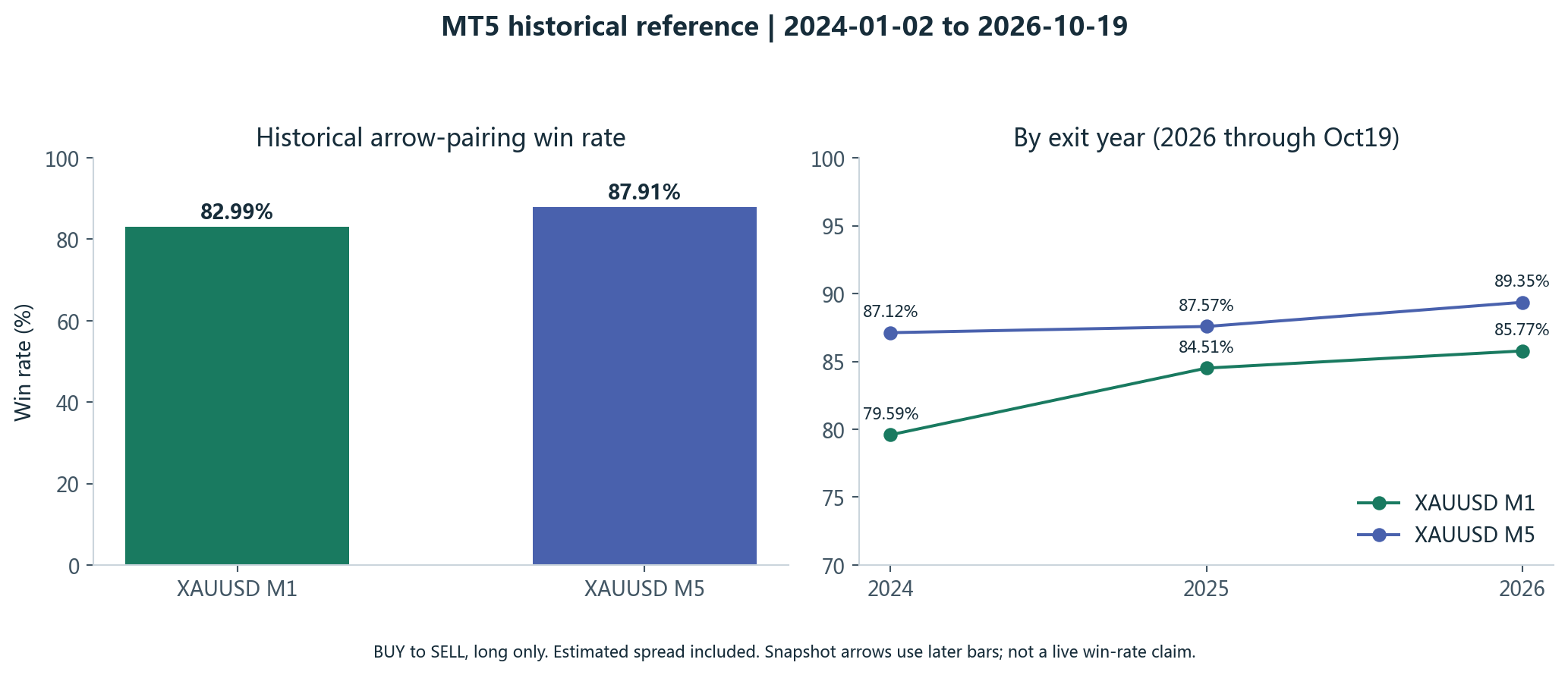
2024-01-02 to2026-10-19. Long only: enter at the next open after BUY; exit at the next open after SELL. No SL/TP. Default signal settings; MaxBars expanded to1000000. Historical spread estimated; commission, financing and slippage excluded.
These are original-MT5 historical-arrow pairings. Centered smoothing uses bars after historical signals, so these figures are not an achievable live win rate. The MT4 page cites the same reference, not an independent full-history MT4 trading backtest.
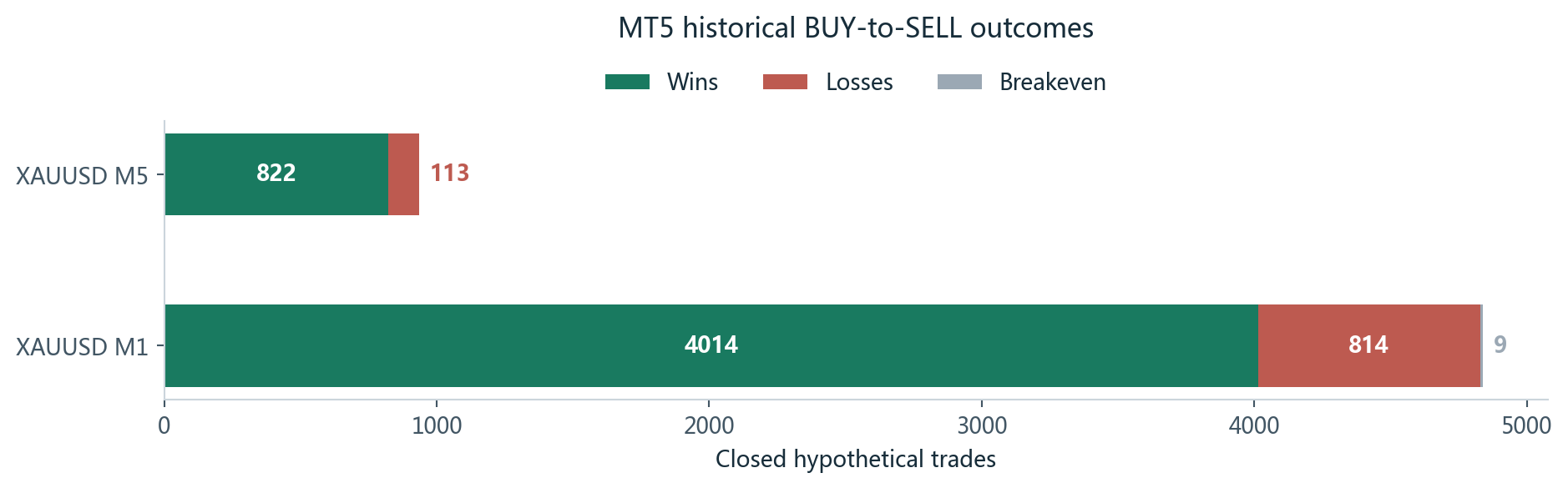
| Timeframe | Closed trades | Wins | Losses | Breakeven | Win rate |
|---|---|---|---|---|---|
| XAUUSD M1 | 4,837 | 4,014 | 814 | 9 | 82.99% |
| XAUUSD M5 | 935 | 822 | 113 | 0 | 87.91% |
Combined Chinese-English PDF manual
One free PDF includes Chinese and English, real terminal screenshots, installation, all91 inputs and statistical methodology. No purchase or login required.
Free download: Chinese + English PDF ↓
Software is delivered through product enquiry. The user manual is free.
The current verification build is valid through 2026-10-21 23:59:59 Beijing time (UTC+8). Confirm the delivered build and license term before purchase.
¥20.00
Indicator file delivery with installation and usage guidance.
Ask about this productTelegram
@alonginchinaPhone
+86 130 5817 0665