MT5-047 · MT5
Fibonacci-8-in-1-Indikator · MT5
Funktionsübersicht
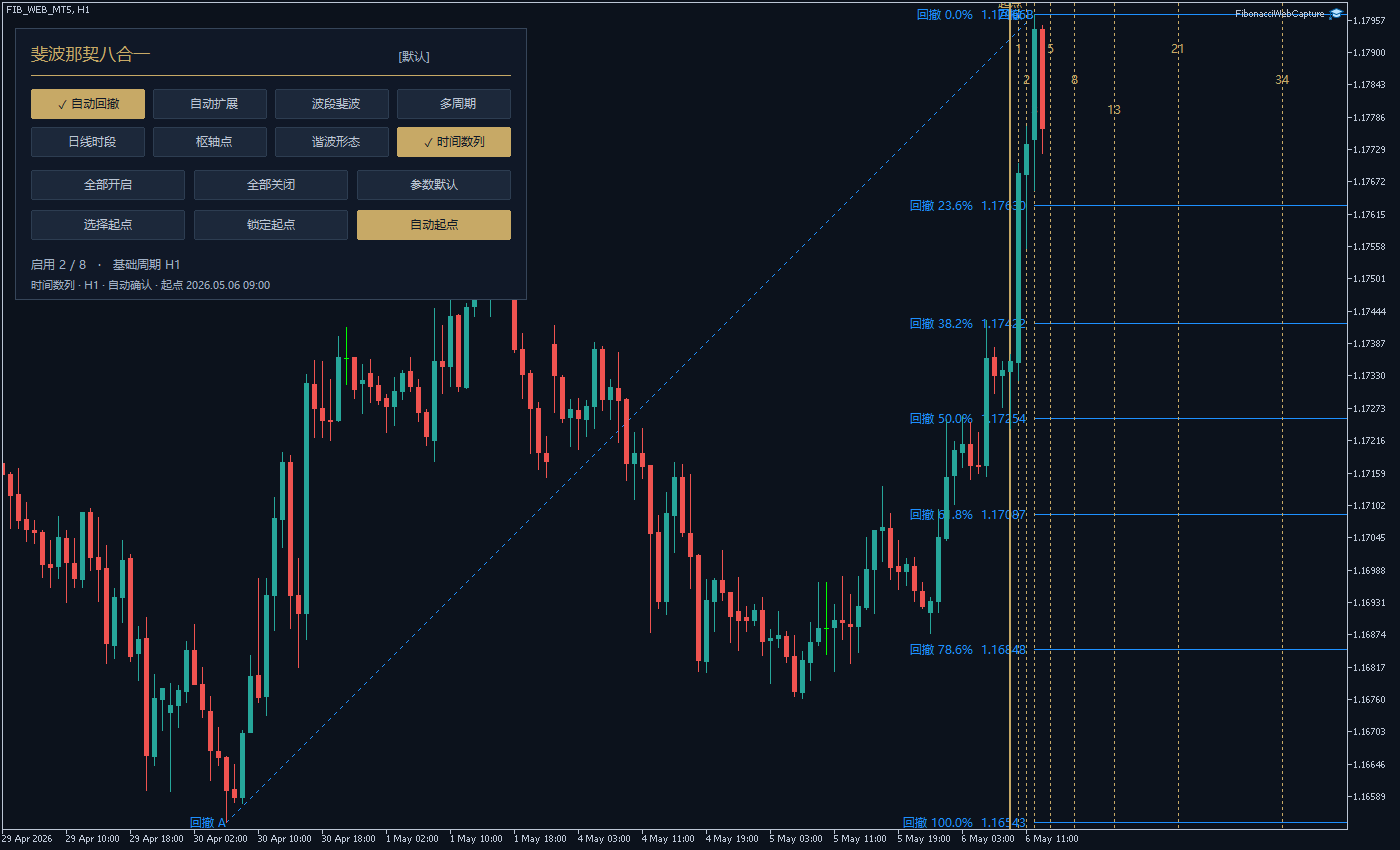
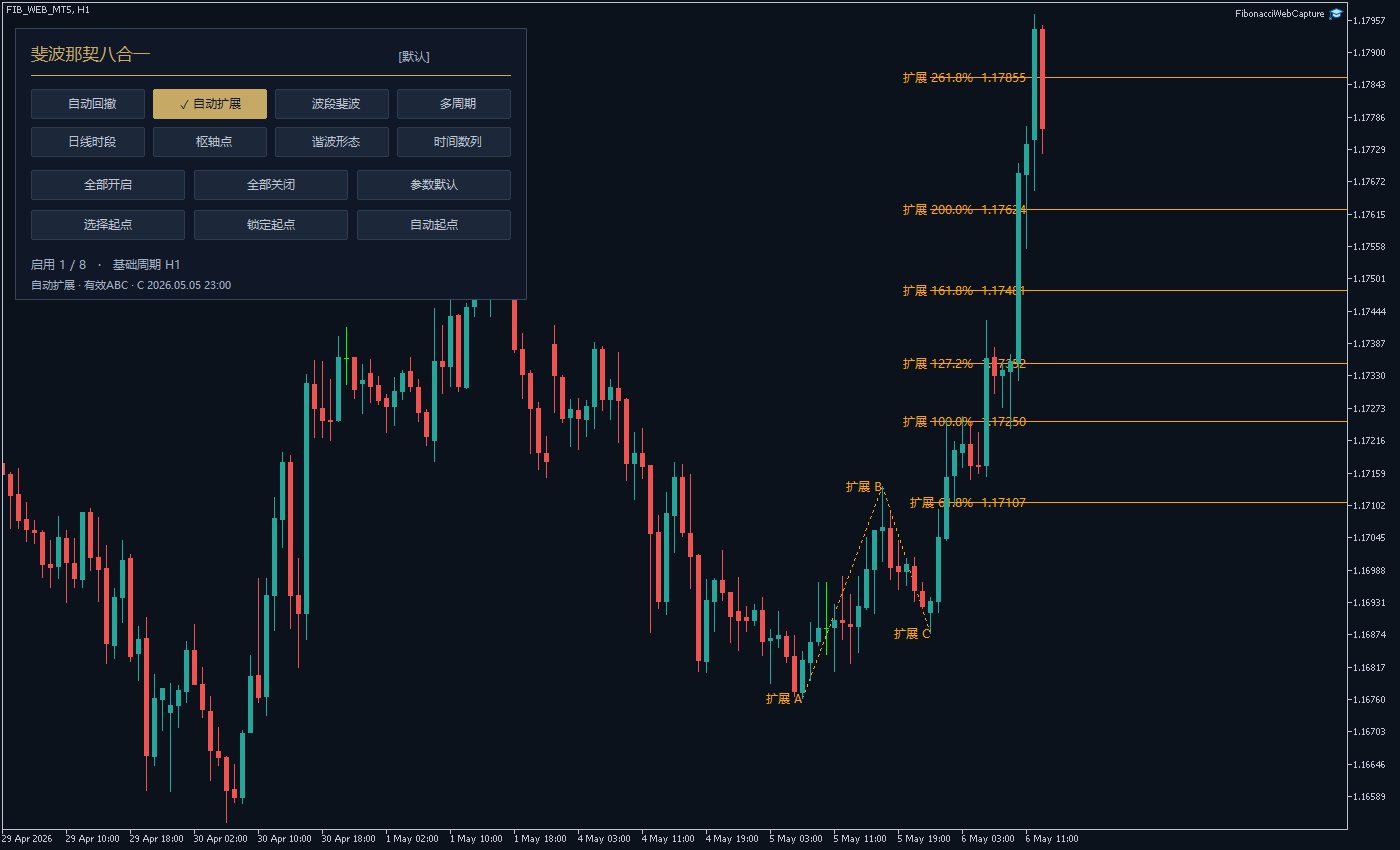
Retracement, Extension, Swings, mehrere Zeitrahmen, Tages-/Sitzungsbereiche, Pivots, Harmonische und Zeitzahlen mit acht unabhängigen Schaltern kombinieren.
Automatisch bestätigte Anker und manuelle Zeitursprünge. Prozentwerte als Liste wie0,23.6,38.2,50,61.8 bearbeiten. Das dunkelblaue/goldene Panel zeigt Status und ABC-Auswahl. Keine automatische Orderausführung.
1. Indikatoransicht
2. Parametereinstellungen
| Parameter | Standardwert | Verwendung |
|---|---|---|
| InpMode | Standardwert Custom | Verwendung Initial display mode: custom switches, one module, or all eight. |
| InpRetrace | Standardwert On | Verwendung Enable automatic retracement at initialization. |
| InpExtend | Standardwert Off | Verwendung Enable automatic ABC extension at initialization. |
| InpSwing | Standardwert Off | Verwendung Enable the latest-confirmed-swing retracement module. |
| InpMTF | Standardwert Off | Verwendung Enable the multi-timeframe retracement module. |
| InpSession | Standardwert Off | Verwendung Enable daily/weekly/custom-session retracement. |
| InpPivot | Standardwert Off | Verwendung Enable Fibonacci pivot points. |
| InpHarmonic | Standardwert Off | Verwendung Enable completed harmonic-pattern recognition. |
| InpTime | Standardwert On | Verwendung Enable Fibonacci integer time intervals. |
| InpCalcTF | Standardwert Chart period | Verwendung Base series for retracement, extension, swing and harmonics. |
| InpInstance | Standardwert 默认 | Verwendung Unique instance name on the same chart; 1-12 characters. |
| InpClosedOnly | Standardwert On | Verwendung Range anchors use closed bars only; confirmed turns always require closed bars. |
| InpHistory | Standardwert 1500 | Verwendung Maximum bars to load per relevant series, 50-20000. |
| InpRetraceMethod | Standardwert Range high/low | Verwendung Retracement anchors: range high/low, confirmed swings, or fractals. |
| InpExtendMethod | Standardwert Confirmed swings | Verwendung Extension anchors: confirmed swings or fractals. |
| InpSwingMethod | Standardwert Confirmed swings | Verwendung Swing-module anchors: confirmed swings or fractals. |
| InpRangeBars | Standardwert 120 | Verwendung High/low lookback for range anchoring, from 2 to InpHistory. |
| InpZZDepth | Standardwert 5 | Verwendung Left/right closed confirmation bars for swing detection, 1-100. |
| InpZZDeviation | Standardwert 0 | Verwendung Minimum swing price distance in quote points; zero disables the filter. |
| InpZZMinBars | Standardwert 3 | Verwendung Minimum spacing between alternating swing anchors; at least 1 bar. |
| InpFractalWing | Standardwert 2 | Verwendung Left/right confirmation bars for fractal detection, 1-100. |
| InpReverse | Standardwert Off | Verwendung Reverse 0% and 100% in all retracement-based modules. |
| InpRetraceLevels | Standardwert 0, 23.6, 38.2, 50, 61.8, 78.6, 100 | Verwendung Percentage list shared by retracement, swing, multi-timeframe and sessions. |
| InpExtendLevels | Standardwert 61.8, 100, 127.2, 161.8, 200, 261.8 | Verwendung Automatic-extension percentage list. For example, 161.8 means ratio 1.618. |
| InpMTFMethod | Standardwert Confirmed swings | Verwendung Common anchor method for the enabled multi-timeframe groups. |
| InpTF1Enabled | Standardwert On | Verwendung Show multi-timeframe group 1 when the parent module is enabled. |
| InpTF1 | Standardwert H1 | Verwendung Calculation timeframe of group 1. |
| InpTF2Enabled | Standardwert On | Verwendung Show multi-timeframe group 2 when the parent module is enabled. |
| InpTF2 | Standardwert H4 | Verwendung Calculation timeframe of group 2. |
| InpTF3Enabled | Standardwert On | Verwendung Show multi-timeframe group 3 when the parent module is enabled. |
| InpTF3 | Standardwert D1 | Verwendung Calculation timeframe of group 3; duplicate resolved periods are not repeated. |
| InpSessionMethod | Standardwert Previous day | Verwendung Previous completed day, week, or custom session. |
| InpSessionStart | Standardwert 08:00 | Verwendung Custom-session start in server time, HH:MM. |
| InpSessionEnd | Standardwert 17:00 | Verwendung Custom-session end in server time, HH:MM; may cross midnight. |
| InpPivotTF | Standardwert D1 | Verwendung Use the previous completed bar in this pivot timeframe. |
| InpPivotLevels | Standardwert 38.2, 61.8, 100 | Verwendung Positive ascending pivot percentages; P is included automatically. |
| InpHarmonicMethod | Standardwert Confirmed fractals | Verwendung Harmonic anchors: confirmed swings or confirmed fractals. |
| InpTolerance | Standardwert 8 | Verwendung Relative percentage tolerance around harmonic ratio conditions, 0-20. |
| InpMaxPatterns | Standardwert 3 | Verwendung Maximum completed harmonic structures to display, 1-20. |
| InpABCD | Standardwert On | Verwendung Enable the equal-leg ABCD template. |
| InpGartley | Standardwert On | Verwendung Enable the Gartley template. |
| InpBat | Standardwert On | Verwendung Enable the Bat template. |
| InpButterfly | Standardwert On | Verwendung Enable the Butterfly template. |
| InpCrab | Standardwert On | Verwendung Enable the Crab template. |
| InpTimeTF | Standardwert Chart period | Verwendung Independent timeframe used to count time-number bars. |
| InpTimeMode | Standardwert Automatic | Verwendung Automatic confirmed-turn origin or manual origin. |
| InpTimeMethod | Standardwert Confirmed fractals | Verwendung Automatic time-origin anchors: swings or fractals. |
| InpTimeAnchor | Standardwert Latest high/low | Verwendung Automatic origin type: latest high/low, high only, or low only. |
| InpTimeLock | Standardwert Off | Verwendung Initial lock of the automatic time origin. |
| InpTimeStart | Standardwert 0 | Verwendung Manual server date/time; zero enters chart selection in manual mode. |
| InpTimeCount | Standardwert 10 | Verwendung Number of displayed integer terms, 3-15; origin 0 is additional. |
| InpTimeUnitBars | Standardwert 1 | Verwendung Multiply every Fibonacci integer by this spacing, 1-10 bars. |
| InpTimeColor | Standardwert C'199,169,102' | Verwendung Time-origin line, integer time lines and labels. |
| InpPanel | Standardwert On | Verwendung Show the eight-module panel; hidden panel does not disable calculations. |
| InpPanelX | Standardwert 12 | Verwendung Panel offset from the chart left edge in pixels; non-negative. |
| InpPanelY | Standardwert 25 | Verwendung Panel offset from the chart upper edge in pixels; non-negative. |
| InpLabels | Standardwert On | Verwendung Show percentage/price labels, time numbers and pattern point labels. |
| InpAnchorLeg | Standardwert On | Verwendung Show retracement AB and extension ABC anchor connections. |
| InpRayRight | Standardwert On | Verwendung Extend price reference lines toward the right. |
| InpLineWidth | Standardwert 1 | Verwendung Primary price-line width, 1-5. |
| InpFontSize | Standardwert 9 | Verwendung Drawing label size, 6-24. |
| InpRetraceColor | Standardwert DodgerBlue | Verwendung Automatic-retracement drawing color. |
| InpExtendColor | Standardwert Orange | Verwendung Automatic-extension drawing color. |
| InpSwingColor | Standardwert MediumPurple | Verwendung Swing-retracement drawing color. |
| InpTF1Color | Standardwert DeepSkyBlue | Verwendung Multi-timeframe group 1 color. |
| InpTF2Color | Standardwert Gold | Verwendung Multi-timeframe group 2 color. |
| InpTF3Color | Standardwert HotPink | Verwendung Multi-timeframe group 3 color. |
| InpSessionColor | Standardwert DarkTurquoise | Verwendung Daily/session drawing color. |
| InpPivotColor | Standardwert Silver | Verwendung Pivot drawing color. |
| InpBullColor | Standardwert LimeGreen | Verwendung Harmonic color for patterns with a low D point. |
| InpBearColor | Standardwert Tomato | Verwendung Harmonic color for patterns with a high D point. |
Installation und Verwendung
Datei unter MQL4 / MQL5 → Indicators ablegen, den Navigator aktualisieren und den Indikator auf den Chart ziehen.
Kostenloses chinesisch-englisches Handbuch
34-seitiges zweisprachiges PDF: acht Methoden, Stärken und Grenzen, modulbezogene Parameter, alle71Einstellungen und echte Plattformaufnahmen. Ohne Kauf oder Anmeldung kostenlos.
Chinesisch-englisches Handbuch · Kostenloses PDF ↓
Free PDF. Contact AISTIM before purchase to confirm the delivered software edition.
¥20.00
Lieferung der Indikatordatei mit Hilfe zur Installation und Verwendung.
Dieses Produkt anfragenTelegram
@alonginchinaTelefon
+86 130 5817 0665