Source: https://aistim.cn/hi/products/mt4-005.html
Language: hi
Last updated: 2026-11-04
[होम](https://aistim.cn/hi/index.html) / [कैटलॉग](https://aistim.cn/hi/mt4.html)
MT4-005 · MT4
# दो रेखाओं वाला MACD
## अंग्रेज़ी संस्करण और कस्टम विकास उपलब्ध
दिखाए गए उत्पाद इंटरफ़ेस मुख्यतः चीनी में हैं। अनुरोध पर अंग्रेज़ी संस्करण उपलब्ध है। अन्य भाषा, सुविधा, इंटरफ़ेस और एकीकरण भी अनुकूलित किए जा सकते हैं। ऑर्डर से पहले संस्करण, डिलीवरी और कीमत तय करने के लिए संपर्क करें।
[अंग्रेज़ी संस्करण या अनुकूलन पूछें](https://aistim.cn/hi/contact.html?product=MT4-005)
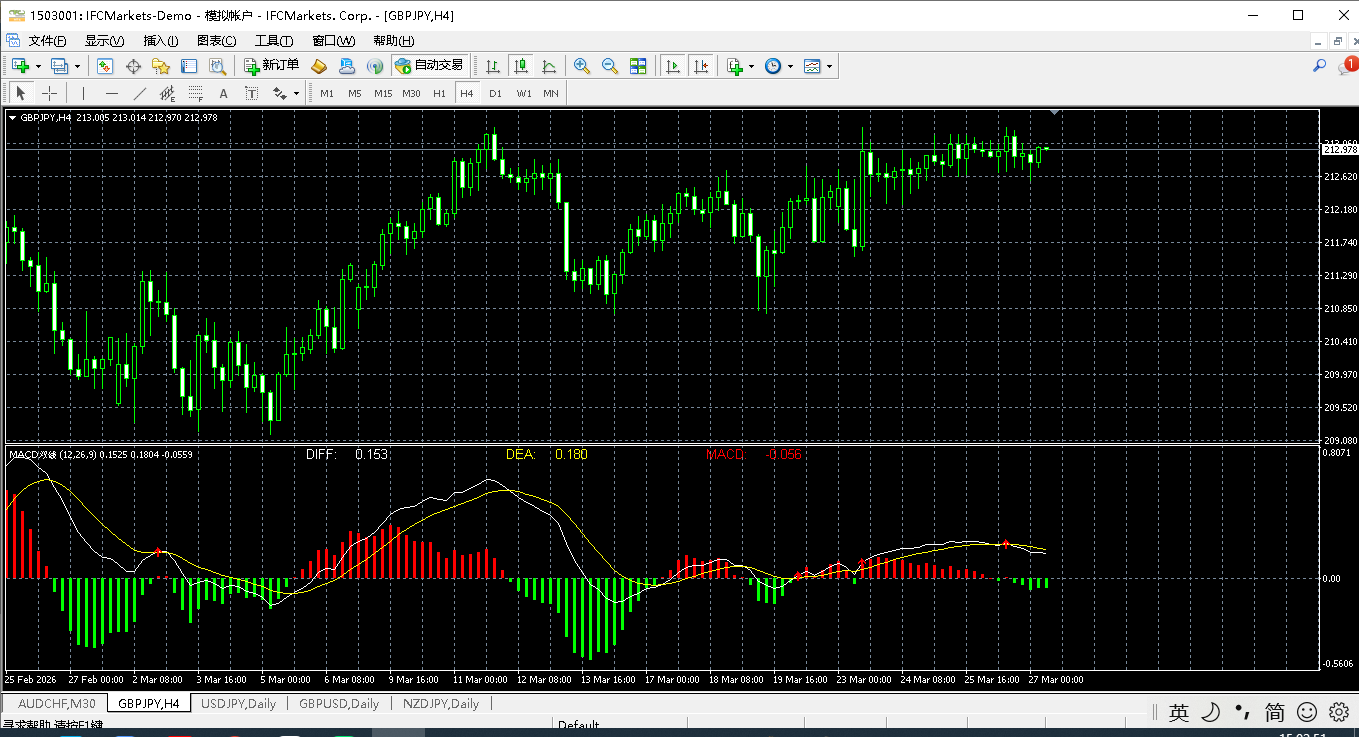
«दो रेखाओं वाला MACD» का MT4 संस्करण: प्रोग्राम स्क्रीनशॉट, उपलब्ध पैरामीटर और इंस्टॉलेशन। खरीदने से पहले संस्करण, अनुकूलता, कीमत और डिलीवरी की पुष्टि करें।
## प्रोग्राम का स्क्रीनशॉट
[](https://aistim.cn/MT4P/MT4股票双线MACD/xiaoguo.png)
प्रोग्राम के वास्तविक स्क्रीनशॉट; लाभ का प्रमाण नहीं।
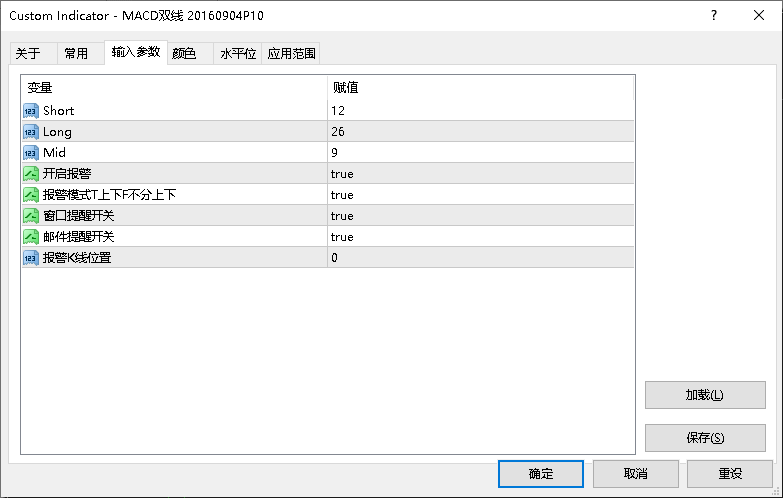
## पैरामीटर
[](https://aistim.cn/MT4P/MT4股票双线MACD/canshu.png)
प्रोग्राम के वास्तविक स्क्रीनशॉट; लाभ का प्रमाण नहीं।
## पैरामीटर
तालिका में पैरामीटर के नाम और मान प्रोग्राम के अनुसार रखे गए हैं ताकि सेटिंग विंडो से तुलना कर सकें। स्क्रीनशॉट में डेमो सेटिंग हो सकती है; खरीदने से पहले उत्पाद के मान की पुष्टि करें।
| प्रोग्राम में पैरामीटर का नाम | डिफ़ॉल्ट मान |
| --- | --- |
| Default 12 / 26 / 9 | How to use Calculation period: the number of bars used by the indicator. |
| Default — | How to use Notification switch: controls alerts, popups or email. Email requires terminal configuration. |
| Default — | How to use Notification switch: controls alerts, popups or email. Email requires terminal configuration. |
| Default 0 | How to use Alert bar: 0 is the current bar; 1 is the previous closed bar. |
## इंस्टॉल और उपयोग
MetaTrader में File → Open Data Folder खोलें। इंडिकेटर को MQL4 या MQL5 → Indicators में, या EA को Experts में रखें। Navigator रीफ़्रेश करें और पहले डेमो खाते में परीक्षण करें।
## संपर्क
फ़ोन, WeChat, QQ, ईमेल या Telegram से संपर्क करें। सटीक उत्तर के लिए उत्पाद और प्लेटफ़ॉर्म बताएँ।
[प्रोजेक्ट पर बात करें](https://aistim.cn/hi/contact.html?product=MT4-005#contact-details)
Telegram
**[@alonginchina](https://t.me/alonginchina)**
फ़ोन
**[+86 130 5817 0665](tel:+8613058170665)**
WeChat
**13058170665**
ईमेल
**[power.yang.china@gmail.com](mailto:power.yang.china@gmail.com)**
QQ
**271715999**
## संबंधित उत्पाद
[MT5-005 · दो रेखाओं वाला MACD](https://aistim.cn/hi/products/mt5-005.html)