Source: https://aistim.cn/en/products/mt5-001.html
Language: en
Last updated: 2026-11-04
[Home](https://aistim.cn/en/index.html) / [MT5 products](https://aistim.cn/en/mt5.html) / 001
MT5 / 001
# Inverted candlesticks with moving averages
## English editions and custom development available
Product interfaces shown on this site are mainly Chinese. English editions are available on request. Other languages, features, interfaces and integrations can be customized; contact us before ordering to agree the edition, deliverables and quote.
[Ask about an English edition or customization](https://aistim.cn/en/contact.html?product=MT5-001)
[Indicator in use](https://aistim.cn/en/products/mt5-001.html#effect)[Parameter settings](https://aistim.cn/en/products/mt5-001.html#parameters)[Contact](https://aistim.cn/en/products/mt5-001.html#purchase)
## Overview
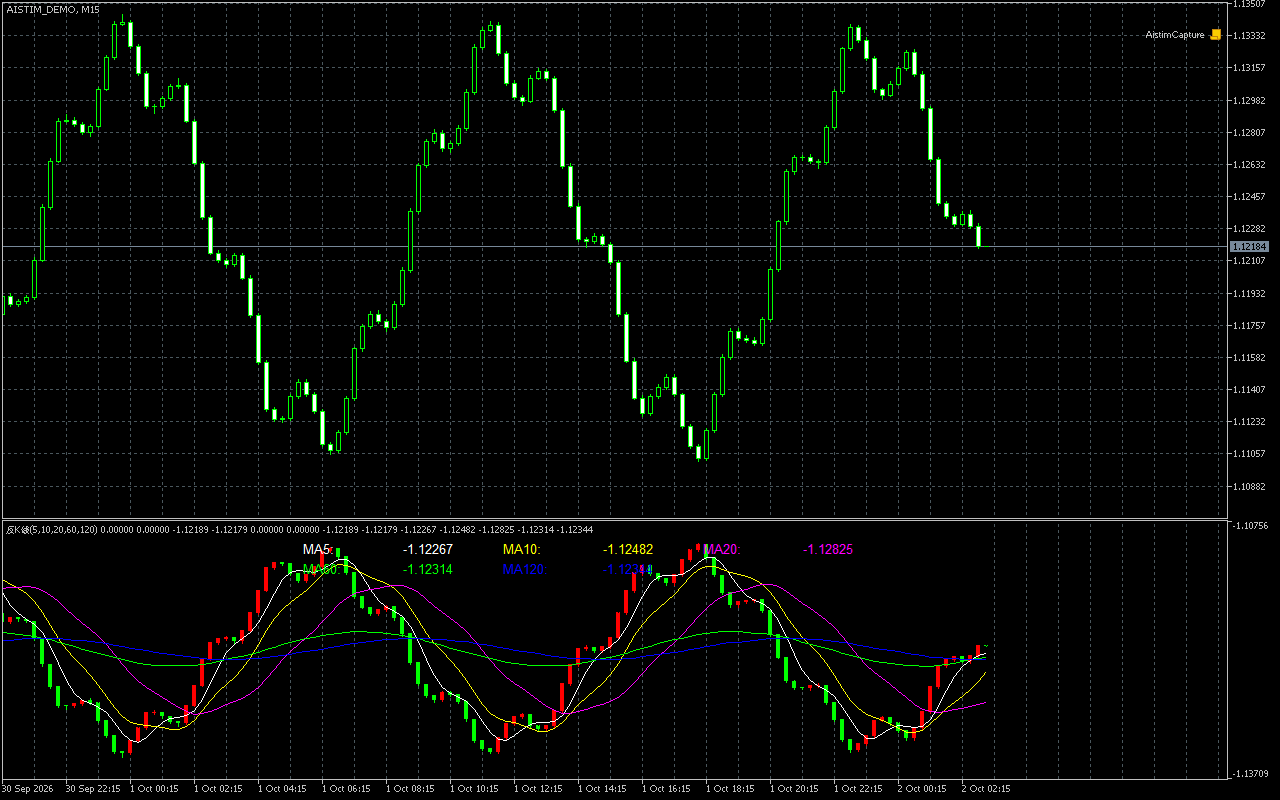
Displays vertically mirrored candlesticks and moving averages in a separate indicator window. Keep the original price chart visible while examining the candle structure from an inverted perspective.
Platform: MetaTrader 5 · Separate window
* Five independently configurable moving-average periods: defaults 5, 10, 20, 60, 120.
* Each moving average has its own smoothing setting; the default method is SMA.
* Chart labels are enabled by default. Candle-body width, wick width and doji length are adjustable.
### When to use it
Choose this edition when you want to compare the original chart and an inverted candle view in separate panes. Adjust the line periods and candle widths to suit your chart layout and visual analysis.
## 1. Indicator in use
[](https://aistim.cn/MT5P/images/001-effect.png)
Actual MT5 screenshot using offline demonstration data.Click the image to view full size
## 2. Parameter settings
[](https://aistim.cn/MT5P/images/001-params.png)
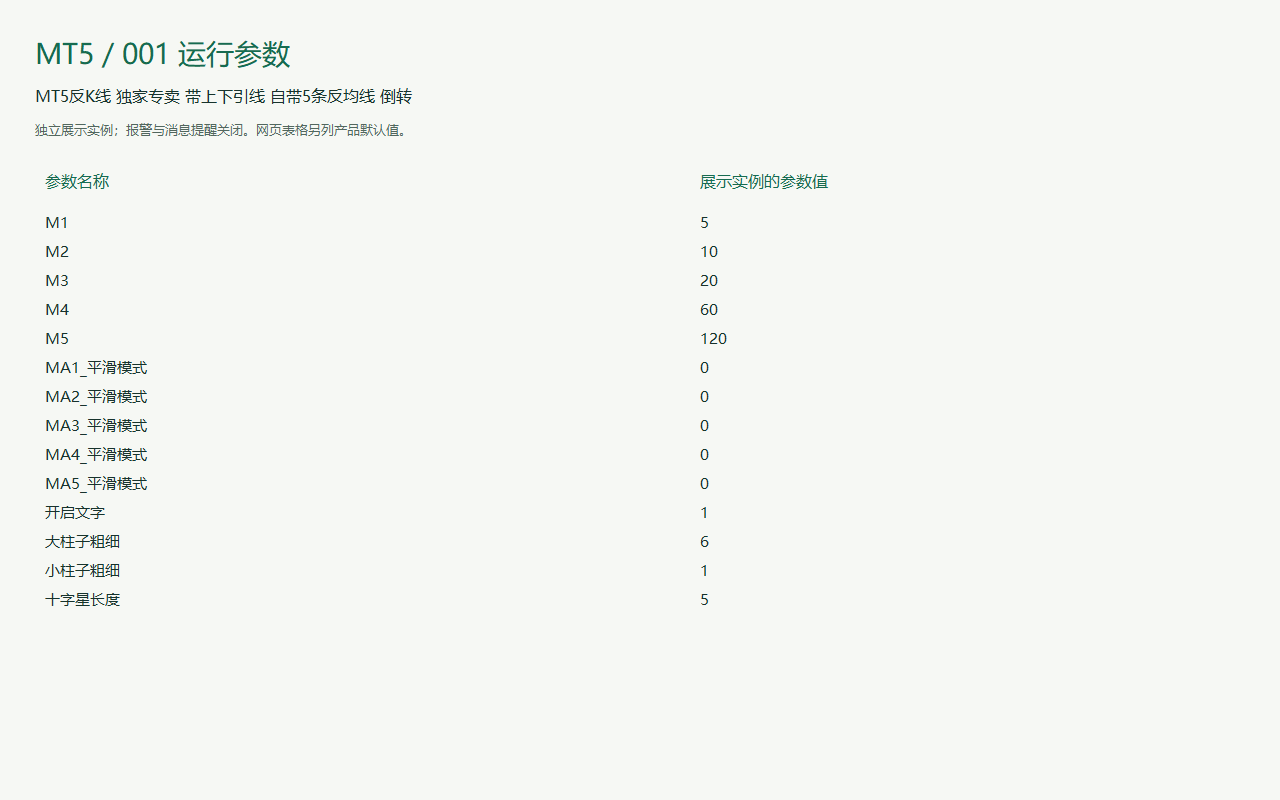
MT5 runtime parameter display. Alerts and messages are disabled for the screenshot instance; product defaults are listed below.Click the image to view full size
| Parameter | Default | How to use |
| --- | --- | --- |
| M1 | Default5 | How to useCalculation period: the number of bars used by the indicator. |
| M2 | Default10 | How to useCalculation period: the number of bars used by the indicator. |
| M3 | Default20 | How to useCalculation period: the number of bars used by the indicator. |
| M4 | Default60 | How to useCalculation period: the number of bars used by the indicator. |
| M5 | Default120 | How to useCalculation period: the number of bars used by the indicator. |
| MA1 Smoothing method | DefaultMODE\_SMA | How to useSmoothing: selects the averaging method. |
| MA2 Smoothing method | DefaultMODE\_SMA | How to useSmoothing: selects the averaging method. |
| MA3 Smoothing method | DefaultMODE\_SMA | How to useSmoothing: selects the averaging method. |
| MA4 Smoothing method | DefaultMODE\_SMA | How to useSmoothing: selects the averaging method. |
| MA5 Smoothing method | DefaultMODE\_SMA | How to useSmoothing: selects the averaging method. |
| Enable text | DefaultEnabled | How to useChart text: shows or hides indicator values and labels. |
| Body width | Default6 | How to useLine or bar width: adjust to suit your chart and screen. |
| Wick width | Default1 | How to useLine or bar width: adjust to suit your chart and screen. |
| Doji length | Default5 | How to useLine or bar width: adjust to suit your chart and screen. |
## Installation and use
Place the indicator file in the terminal’s MQL4 / MQL5 → Indicators folder, refresh Navigator, then drag it onto a chart.
MT5 · Indicators
Ask for pricing
Indicator file delivery with installation and usage guidance.
[Ask about this product](https://aistim.cn/en/contact.html?product=MT5-001)
Telegram
[@alonginchina](https://t.me/alonginchina)
Phone
[+86 130 5817 0665](tel:+8613058170665)
WeChat
**13058170665**
Email
[power.yang.china@gmail.com](mailto:power.yang.china@gmail.com)
QQ
**271715999**
## Platform editions
[View the MT4 edition](https://aistim.cn/en/products/mt4-001.html)
## Related indicators
* [Main-chart mirrored candlesticks](https://aistim.cn/en/products/mt5-002.html)
[Back to products](https://aistim.cn/en/mt5.html)[Next product](https://aistim.cn/en/products/mt5-002.html)