Source: https://aistim.cn/en/products/mt4-009.html
Language: en
Last updated: 2026-11-04
[Home](https://aistim.cn/en/index.html) / [MT4 products](https://aistim.cn/en/mt4.html) / 009
MT4 / 009
# Moving-average crossover alerts
## English editions and custom development available
Product interfaces shown on this site are mainly Chinese. English editions are available on request. Other languages, features, interfaces and integrations can be customized; contact us before ordering to agree the edition, deliverables and quote.
[Ask about an English edition or customization](https://aistim.cn/en/contact.html?product=MT4-009)
[Indicator in use](https://aistim.cn/en/products/mt4-009.html#effect)[Parameter settings](https://aistim.cn/en/products/mt4-009.html#parameters)[Contact](https://aistim.cn/en/products/mt4-009.html#purchase)
## Overview
Moving-average crossover alerts · MT4
Platform: MetaTrader 4 · Main chart
* Calculation period: the number of bars used by the indicator.
* Smoothing: selects the averaging method.
* Chart text: shows or hides indicator values and labels.
* Alert bar: 0 is the current bar; 1 is the previous closed bar.
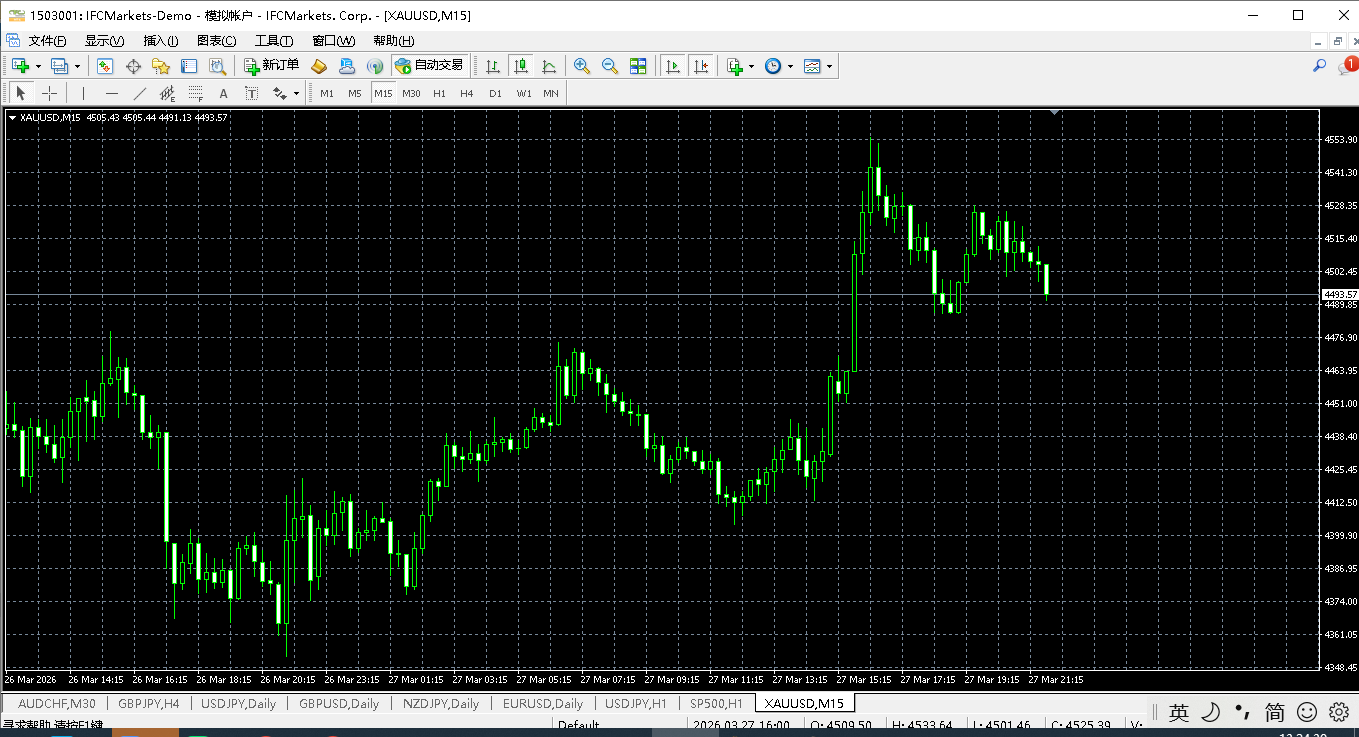
## 1. Indicator in use
[](https://aistim.cn/MT4P/009任意2条均线金叉死叉/xiaoguo.png)
Screenshots retain the software’s original interface text. The explanations below use the selected page language.Click the image to view full size
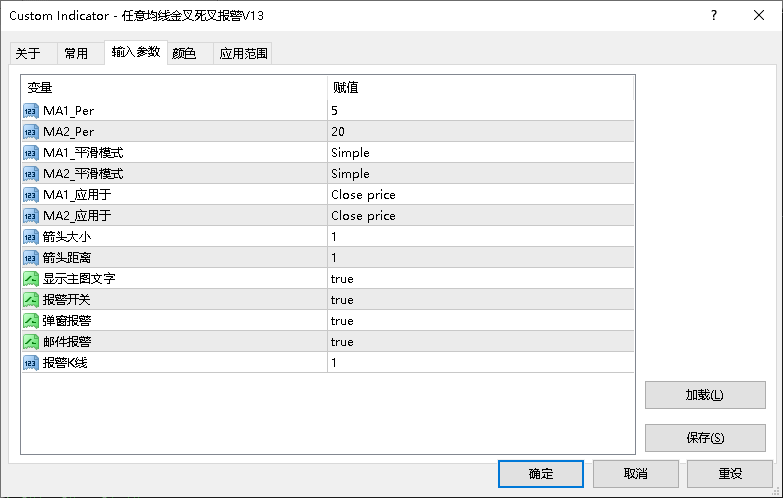
## 2. Parameter settings
[](https://aistim.cn/MT4P/009任意2条均线金叉死叉/canshu.png)
Screenshots retain the software’s original interface text. The explanations below use the selected page language.Click the image to view full size
| Parameter | Default | How to use |
| --- | --- | --- |
| Parameter · Calculation period | Default5 / 20 | How to useCalculation period: the number of bars used by the indicator. |
| Parameter · Smoothing | Default— | How to useSmoothing: selects the averaging method. |
| Show chart text | Default— | How to useChart text: shows or hides indicator values and labels. |
| Parameter · Alert bar | Default— | How to useAlert bar: 0 is the current bar; 1 is the previous closed bar. |
| Parameter · Calculation period | Default— | How to useCalculation period: the number of bars used by the indicator. |
## Installation and use
Place the indicator file in the terminal’s MQL4 / MQL5 → Indicators folder, refresh Navigator, then drag it onto a chart.
MT4 · Indicators
¥20.00
Indicator file delivery with installation and usage guidance.
[Ask about this product](https://aistim.cn/en/contact.html?product=MT4-009)
Telegram
[@alonginchina](https://t.me/alonginchina)
Phone
[+86 130 5817 0665](tel:+8613058170665)
WeChat
**13058170665**
Email
[power.yang.china@gmail.com](mailto:power.yang.china@gmail.com)
QQ
**271715999**
## Platform editions
[View the MT5 edition](https://aistim.cn/en/products/mt5-009.html)
## Related indicators
* [Color-changing moving average](https://aistim.cn/en/products/mt4-019.html)
* [EXPMA](https://aistim.cn/en/products/mt4-024.html)
[Previous product](https://aistim.cn/en/products/mt4-008.html)[Back to products](https://aistim.cn/en/mt4.html)[Next product](https://aistim.cn/en/products/mt4-010.html)